Installation via Helm
This section describes the installation process for TDP Kubernetes components using the Helm CLI.
In this approach, components are installed through the direct execution of helm install commands, which deploy into the Kubernetes cluster the resources defined in each Helm Chart available in the private Tecnisys OCI registry.
Installation via Helm applies the charts manually or through external automation, one command at a time, with direct control over the deployment sequence of each component.
Before starting the installation, ensure that all prerequisites have been met, including authentication to the Tecnisys OCI registry.
Installation Order
Component installation must follow a specific order so that dependencies are satisfied. The table below shows the recommended order:
| Order | Chart | Component | Version | Dependencies |
|---|---|---|---|---|
| 1 | tdp-argo-crds | ArgoCD CRDs | 3.2.5 | None |
| 2 | tdp-argo | ArgoCD | 3.2.5 | tdp-argo-crds |
| 3 | tdp-postgresql | PostgreSQL | 17.5.0 | None |
| 4 | tdp-kafka | Kafka (Strimzi) | 4.1.0 | None |
| 5 | tdp-hive-metastore | Hive Metastore | 4.0.0 | None |
| 6 | tdp-deltalake | Delta Lake | 4.0.0 | None |
| 7 | tdp-iceberg | Iceberg | 1.10.0 | None |
| 8 | tdp-ozone | Apache Ozone | 2.0.0 | None |
| 9 | tdp-ranger | Ranger | 2.7.0 | tdp-postgresql |
| 10 | tdp-nifi | NiFi | 1.28.0 | None |
| 11 | tdp-spark | Spark | 4.0.0 | None |
| 12 | tdp-trino | Trino | 478 | None |
| 13 | tdp-airflow | Airflow | 3.0.2 | tdp-postgresql |
| 14 | tdp-jupyter | JupyterHub | 5.3.0 | None |
| 15 | tdp-clickhouse | ClickHouse | 25.8.11.66 | None |
| 16 | tdp-cloudbeaver | CloudBeaver | 25.2.3 | tdp-postgresql |
| 17 | tdp-openmetadata | OpenMetadata | 1.9.11 | tdp-postgresql |
| 18 | tdp-superset | Superset | 5.0.0 | tdp-postgresql |
The Version column refers to the component version (e.g. Kafka 4.1.0, ArgoCD 3.2.5). The Helm chart version is 3.0.0 for all TDP charts; when omitting --version in helm install, Helm uses the latest available in the registry.
tdp-postgresql is a dependency and must be installed before the components that use it: Airflow, OpenMetadata, Ranger, Superset, and CloudBeaver. Installing these components without PostgreSQL running will result in failure.
As recommended for production environments, these components should use an external database. However, if no external database is provided, each component will use an exclusive internal instance.
- Component Installation
- Installation Verification
- Troubleshooting
- Commands
- Video
Installation
The installation pattern is the same for all components. For each chart, run:
helm install <chart-name> oci://registry.tecnisys.com.br/tdp/charts/<chart-name> \
  -n <namespace> \
  --create-namespace
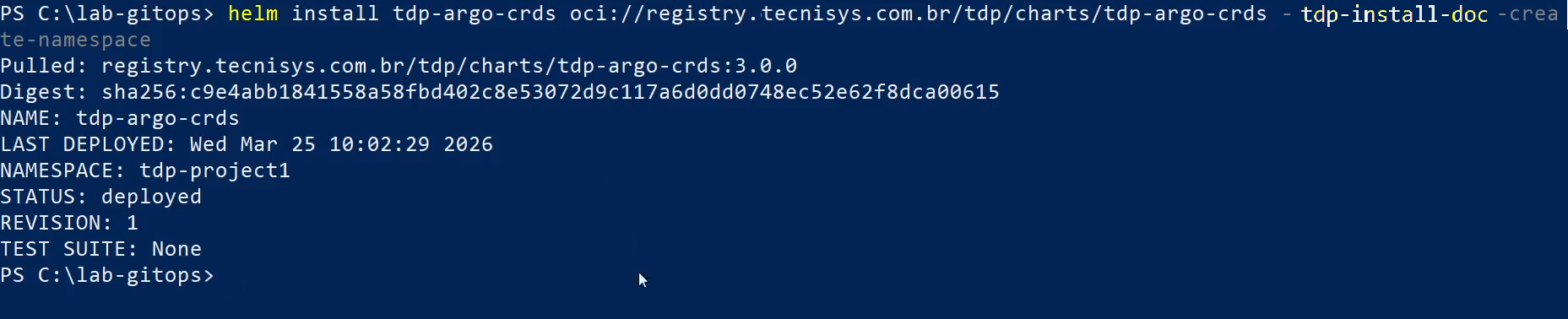
The --create-namespace parameter creates the <namespace> namespace automatically on the first installation. On subsequent installations, the namespace will already exist and the parameter will be ignored.
If the --version flag is omitted, Helm will automatically install the latest version available in the registry. To pin a specific version, use --version <chart-version>. The version of each component (Kafka, Airflow, etc.) can only be determined by opening the Helm chart or after installation.
After installing each component, wait for the pods to become ready before proceeding:
kubectl get pods -n <namespace> --watch

Press Ctrl+C when all of the component's pods are in Running status and READY.
1. ArgoCD CRDs
helm install tdp-argo-crds oci://registry.tecnisys.com.br/tdp/charts/tdp-argo-crds \
  -n <namespace> \
  --create-namespace
2. ArgoCD
helm install tdp-argo oci://registry.tecnisys.com.br/tdp/charts/tdp-argo \
  -n <namespace> \
  --create-namespace
3. PostgreSQL
helm install tdp-postgresql oci://registry.tecnisys.com.br/tdp/charts/tdp-postgresql \
  -n <namespace>
Wait for PostgreSQL to be fully operational before proceeding with the installation of components that depend on it. Check the status:
kubectl get pods -n <namespace> | grep tdp-postgresql
The pod should show status Running and have all replicas ready (READY 1/1).
4. Kafka (Strimzi)
helm install tdp-kafka oci://registry.tecnisys.com.br/tdp/charts/tdp-kafka \
  -n <namespace>
Kafka uses the Strimzi operator for broker and topic management in Kubernetes.
5. Hive Metastore
helm install tdp-hive-metastore oci://registry.tecnisys.com.br/tdp/charts/tdp-hive-metastore \
  -n <namespace>
6. Delta Lake
helm install tdp-deltalake oci://registry.tecnisys.com.br/tdp/charts/tdp-deltalake \
  -n <namespace>
7. Iceberg
helm install tdp-iceberg oci://registry.tecnisys.com.br/tdp/charts/tdp-iceberg \
  -n <namespace>
8. Apache Ozone
helm install tdp-ozone oci://registry.tecnisys.com.br/tdp/charts/tdp-ozone \
  -n <namespace>
9. Ranger
helm install tdp-ranger oci://registry.tecnisys.com.br/tdp/charts/tdp-ranger \
  -n <namespace>
10. NiFi
helm install tdp-nifi oci://registry.tecnisys.com.br/tdp/charts/tdp-nifi \
  -n <namespace>
11. Spark
helm install tdp-spark oci://registry.tecnisys.com.br/tdp/charts/tdp-spark \
  -n <namespace>
12. Trino
helm install tdp-trino oci://registry.tecnisys.com.br/tdp/charts/tdp-trino \
  -n <namespace>
13. Airflow
helm install tdp-airflow oci://registry.tecnisys.com.br/tdp/charts/tdp-airflow \
  -n <namespace>
Airflow requires PostgreSQL to be operational. In addition, if you use the CeleryExecutor or KubernetesExecutor with DAG sharing via volume, ensure that a Storage Class with ReadWriteMany (RWX) support is available.
14. JupyterHub
helm install tdp-jupyter oci://registry.tecnisys.com.br/tdp/charts/tdp-jupyter \
  -n <namespace>
15. ClickHouse
helm install tdp-clickhouse oci://registry.tecnisys.com.br/tdp/charts/tdp-clickhouse \
  -n <namespace>
16. CloudBeaver
helm install tdp-cloudbeaver oci://registry.tecnisys.com.br/tdp/charts/tdp-cloudbeaver \
  -n <namespace>
17. OpenMetadata
helm install tdp-openmetadata oci://registry.tecnisys.com.br/tdp/charts/tdp-openmetadata \
  -n <namespace>
18. Superset
helm install tdp-superset oci://registry.tecnisys.com.br/tdp/charts/tdp-superset \
  -n <namespace>
- Commands
- Videos
Installation Verification
After installing all desired components, verify the overall installation status.
Verify Pods
kubectl get pods -n <namespace>
All pods should show status Running and have all replicas ready.
Verify Helm Releases
helm list -n <namespace>

All releases should show status deployed.
Verify Services
kubectl get svc -n <namespace>

Verify Persistent Volumes
kubectl get pvc -n <namespace>

All Persistent Volume Claims should show status Bound.
- Verify Pods
- Verify Helm Releases
- Verify Services
- Verify Persistent Volumes
Pods Not Starting
If a pod remains in Pending or CrashLoopBackOff status:
- Check the pod events:
kubectl describe pod <pod-name> -n <namespace>
- Check the pod logs:
kubectl logs <pod-name> -n <namespace>
- Common causes:
- Insufficient resources: the cluster does not have enough CPU or memory to schedule the pod. Check with
kubectl describe node - Pending PVC: the configured Storage Class is not available or does not support the requested access mode
- Unmet dependency: the component depends on PostgreSQL or another service that is not yet operational
Image Pull Error (ImagePullBackOff)
If a pod shows status ImagePullBackOff or ErrImagePull:
- Verify that registry authentication was performed correctly:
helm registry login registry.tecnisys.com.br
- Verify that the registry authentication Secret is configured in the namespace:
kubectl get secrets -n <namespace> | grep registry
- If necessary, create the Secret manually:
kubectl create secret docker-registry tdp-registry-secret \
  --docker-server=registry.tecnisys.com.br \
  --docker-username=<username> \
  --docker-password=<password> \
  -n <namespace>
Database Connection Failure
If components such as Airflow, Superset, Ranger, OpenMetadata, or CloudBeaver show database connection errors:
- Verify that PostgreSQL is operational:
kubectl get pods -n <namespace> | grep tdp-postgresql
- Verify internal cluster connectivity:
kubectl run pg-test --rm -it --image=busybox -n <namespace> -- \
  sh -c "nc -zv tdp-postgresql 5432"
- Verify the credentials configured in the component chart values
Uninstall a Problematic Component
To uninstall and reinstall a specific component:
helm uninstall <chart-name> -n <namespace>
helm install <chart-name> oci://registry.tecnisys.com.br/tdp/charts/<chart-name> \
  -n <namespace>
Uninstalling a Helm release does not remove the associated Persistent Volume Claims (PVCs). For a clean reinstallation, delete the PVCs manually before reinstalling:
kubectl delete pvc <pvc-name> -n <namespace>