Uninstallation
This guide explains how to remove TDP Kubernetes components in an organized and safe way.
Before you begin
Clarify what is being removed:
- components installed directly with Helm
- Applications managed by Argo CD
- Argo CD itself, when it is also part of the removal
This document keeps each scenario clearly separated.
Removing Kubernetes resources does not automatically remove persisted data. PVCs, PVs, snapshots, and the namespace must be considered separately.
Before you run any removal, identify how the component or environment was deployed.
1. Check whether the component was installed with Helm
Use this command to list existing Helm releases in the namespace:
helm list -n <namespace>

If the component appears in this list, the primary removal path is helm uninstall.
2. Check whether the component is managed by Argo CD
Use this command to list Applications managed by Argo CD:
argocd app list

If the component appears as an Argo CD Application, the primary removal path is argocd app delete.
Do not mix flows unnecessarily. If the component is managed by Argo CD, the primary path is to delete the Application. If it was installed directly with Helm, the primary path is to remove the Helm release.
Preparation before removal
Back up data
Before removing any stateful component, back up anything that must be preserved.
Common examples:
- PostgreSQL: database dump
- ClickHouse: export tables and schemas
- Airflow: DAGs, variables, and connections
- OpenMetadata: metadata and lineage
- Ranger: policies and relevant configuration
Export the Helm release configuration
When the component was installed with Helm, export the values currently applied:
helm get values <release> -n <namespace> -o yaml > <release>-values-backup.yaml

This file usually contains the values overridden during install or upgrade.
To see every parameter accepted by the chart, use helm show values on the corresponding chart.
To export values for all releases in the namespace in one go:
for release in $(helm list -n <namespace> -q); do
  helm get values "$release" -n <namespace> -o yaml > "${release}-values-backup.yaml"
  echo "Backup of $release completed"
done
Identify associated PVCs
Before removing the component, check whether persistent volumes are associated with it:
kubectl get pvc -n <namespace>

To narrow the query to a specific Helm release:
kubectl get pvc -n <namespace> -l app.kubernetes.io/instance=<release>
Create persistent volume snapshots when supported
If the cluster supports CSI snapshots and a VolumeSnapshotClass is available, create snapshots of critical PVCs before removal.
Check whether the cluster supports snapshots:
kubectl get volumesnapshotclass
Create the snapshot:
kubectl apply -f - <<EOT
apiVersion: snapshot.storage.k8s.io/v1
kind: VolumeSnapshot
metadata:
  name: <pvc-name>-final-snapshot
  namespace: <namespace>
spec:
  volumeSnapshotClassName: <snapshot-class>
  source:
    persistentVolumeClaimName: <pvc-name>
EOT
Verify the result:
kubectl get volumesnapshot -n <namespace>
Removing components
- Via Helm
- Via Argo CD
- Commands
- Videos
Uninstall a single component
Use this flow when the component was installed directly as a Helm release.
Uninstall the release
helm uninstall <release> -n <namespace>

Verify that the release resources were removed
kubectl get all -n <namespace> -l app.kubernetes.io/instance=<release>

This command shows what is still associated with the release after helm uninstall.
If the output is empty, the resources were removed successfully.
Check remaining PVCs
kubectl get pvc -n <namespace> -l app.kubernetes.io/instance=<release>

helm uninstall removes the release and its associated Kubernetes resources — Deployments, StatefulSets, Services, ConfigMaps, and Secrets.
PVCs are usually not removed automatically.
Remove the full environment with Helm
Use this flow when the entire environment was deployed directly with Helm, without Applications managed by Argo CD.
Remove releases in reverse dependency order
helm uninstall tdp-superset -n <namespace>
helm uninstall tdp-openmetadata -n <namespace>
helm uninstall tdp-cloudbeaver -n <namespace>
helm uninstall tdp-jupyter -n <namespace>
helm uninstall tdp-airflow -n <namespace>
helm uninstall tdp-clickhouse -n <namespace>
helm uninstall tdp-trino -n <namespace>
helm uninstall tdp-spark -n <namespace>
helm uninstall tdp-nifi -n <namespace>
helm uninstall tdp-ranger -n <namespace>
helm uninstall tdp-iceberg -n <namespace>
helm uninstall tdp-deltalake -n <namespace>
helm uninstall tdp-hive-metastore -n <namespace>
helm uninstall tdp-kafka -n <namespace>
helm uninstall tdp-postgresql -n <namespace>
helm uninstall tdp-argo -n <namespace>
helm uninstall tdp-argo-crds -n <namespace>
Check remaining PVCs
kubectl get pvc -n <namespace>
Remove PVCs if the teardown is definitive
kubectl delete pvc --all -n <namespace>

Deleting PVCs permanently removes persisted data. Do this only when the teardown is definitive and backups are complete.
- helm list
- helm get values
- helm uninstall
- kubectl get pvc
- kubectl get pvc (by release)
- kubectl get all
- kubectl delete pvc
- kubectl delete pvc --all
- kubectl get pv
- Full demo
- Commands
- Videos
Remove a single component via Argo CD
Use this flow when the component is managed as an Argo CD Application.
Delete the Application
argocd app delete <application-name> --cascade

Verify removal
argocd app list
Check remaining resources in the namespace
kubectl get all -n <namespace>

Check remaining PVCs
kubectl get pvc -n <namespace>
The --cascade option deletes the Application and the Kubernetes resources it manages.
PVCs, PVs, and other infrastructure leftovers may still need extra checks and cleanup.
Remove the full environment via Argo CD
Use this path when the entire TDP environment is deployed and managed by Argo CD.
Option A — Delete a root app-of-apps Application
If the environment uses a root Application that controls the others, you can start removal there:
argocd app delete <root-application> --cascade
Use this only when the app-of-apps model is validated in your environment and you are sure deleting the root app will correctly remove child applications and their resources.
Option B — Delete Applications one by one in reverse dependency order
When there is no root app, or when you want full control of the teardown, delete Applications individually:
argocd app delete tdp-superset --cascade
argocd app delete tdp-openmetadata --cascade
argocd app delete tdp-cloudbeaver --cascade
argocd app delete tdp-jupyter --cascade
argocd app delete tdp-airflow --cascade
argocd app delete tdp-clickhouse --cascade
argocd app delete tdp-trino --cascade
argocd app delete tdp-spark --cascade
argocd app delete tdp-nifi --cascade
argocd app delete tdp-ranger --cascade
argocd app delete tdp-iceberg --cascade
argocd app delete tdp-deltalake --cascade
argocd app delete tdp-hive-metastore --cascade
argocd app delete tdp-kafka --cascade
argocd app delete tdp-postgresql --cascade
Check whether any Applications remain
argocd app list
Check whether resources remain in the namespace
kubectl get all -n <namespace>
Check remaining PVCs
kubectl get pvc -n <namespace>
Remove PVCs if the teardown is definitive
kubectl delete pvc --all -n <namespace>
Deleting PVCs permanently removes persisted data. Do this only when the teardown is definitive and backups are complete.
Remove the Argo CD infrastructure
This step is separate from removing the TDP environment.
First remove all Applications and workloads managed by Argo CD. Only then remove Argo CD itself, if that is part of the goal.
Argo CD is removed with Helm, regardless of how the TDP environment was managed.
Uninstall the Argo CD releases
helm uninstall tdp-argo -n <namespace>
helm uninstall tdp-argo-crds -n <namespace>
Removing tdp-argo-crds must be considered carefully.
CRDs are cluster-scoped resources and may be shared by other installations or projects in the same cluster.
Check remaining CRDs
kubectl get crds | grep argoproj.io
To delete CRDs manually, if needed:
kubectl delete crds -l app.kubernetes.io/part-of=argocd
- argocd app delete
- argocd app list
- kubectl get all
Additional cleanup
Check for orphaned PersistentVolumes
After removing PVCs, check for PVs in Released state:
kubectl get pv | grep <namespace>
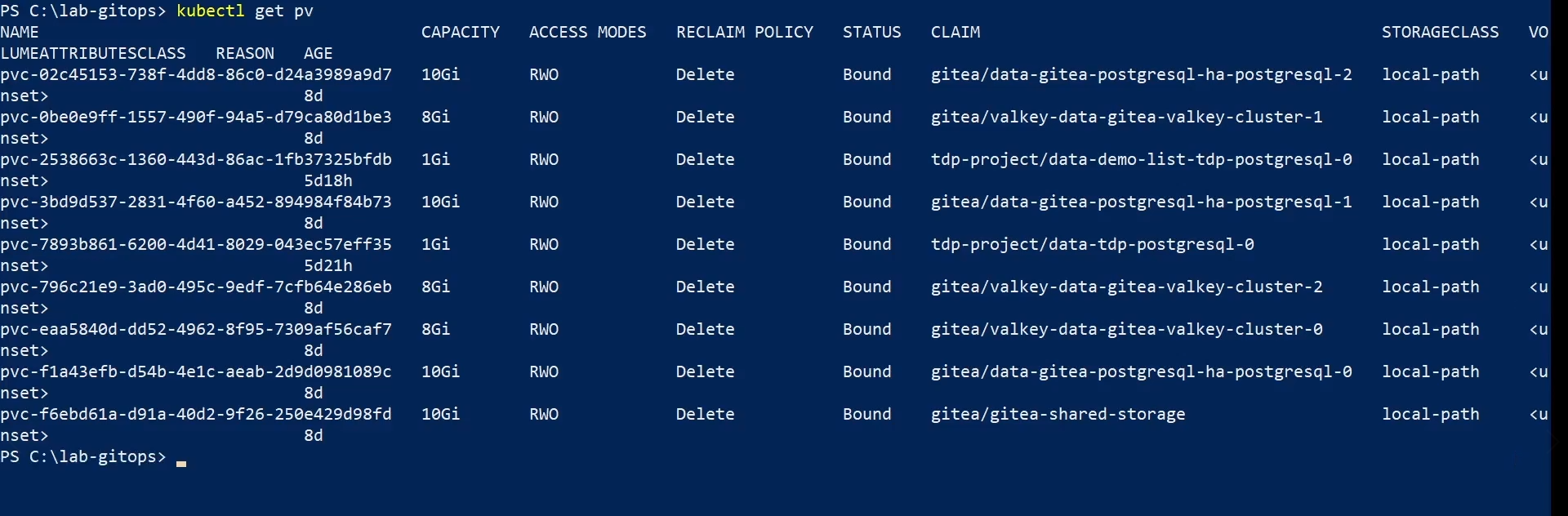
If there are orphaned PVs and you no longer need them:
kubectl delete pv <pv-name>
Remove the namespace, when applicable
Delete the namespace only when it is dedicated exclusively to the environment being torn down.
kubectl delete namespace <namespace>
Deleting the namespace removes all namespaced resources still in it, including PVCs, ConfigMaps, Secrets, and ServiceAccounts.
If the namespace is stuck in Terminating, check finalizers:
kubectl get namespace <namespace> -o json | jq '.spec.finalizers'
To force finalization:
kubectl get namespace <namespace> -o json | jq '.spec.finalizers = []' | \
kubectl replace --raw "/api/v1/namespaces/<namespace>/finalize" -f -
Final verification
After removal, confirm nothing unexpected remains.
Check remaining resources in the namespace
kubectl get all -n <namespace>
Check remaining Helm releases
helm list -n <namespace>
Check remaining Applications in Argo CD
argocd app list
Check remaining PVCs
kubectl get pvc -n <namespace>
Check remaining PVs
kubectl get pv | grep <namespace>
Summary
| Situation | Primary path | Note |
|---|---|---|
| Component installed directly with Helm | helm uninstall <release> -n <namespace> | Use when a real Helm release exists |
| Component managed by Argo CD | argocd app delete <application-name> --cascade | Deletes the Application and managed resources |
| Full removal of environment managed by Argo CD | argocd app delete ... --cascade in reverse order, or delete the root app | PVCs and PVs may need manual cleanup |
| Removing Argo CD itself | helm uninstall tdp-argo -n <namespace> | Should happen after Applications are removed |
| Full removal of environment installed with Helm | sequence of helm uninstall in reverse order | Separate flow from the Argo CD model |
| Cleaning up persistent data | kubectl delete pvc ... and, if needed, kubectl delete pv ... | Manual, destructive step |
| Namespace cleanup | kubectl delete namespace <namespace> | Only when the namespace is dedicated to the removed environment |