Installation via Helm
This section describes the process of installing TDP Kubernetes components using the Helm CLI.
In this approach, components are installed by directly executing helm install commands, which deploy the resources defined in each Helm Chart available in the Tecnisys private OCI registry to the Kubernetes cluster.
When installing via Helm, the charts are applied manually or through external automation, command by command, with direct control over the implementation sequence of each component.
Before starting the installation, make sure that all prerequisites have been met, including authentication to the Tecnisys OCI registry.
Installation Order
Component installation must follow a specific order to ensure that dependencies are met. The table below presents the recommended order:
| Order | Chart | Component | Version | Dependencies |
|---|---|---|---|---|
| 1 | tdp-crds | Platform CRDs | 3.0.1 | None |
| 2 | tdp-argo | Argo CD | 3.2.5 | tdp-crds |
| 3 | tdp-postgresql | PostgreSQL | 17.5.0 | None |
| 4 | tdp-kafka | Kafka (Strimzi) | 4.1.0 | tdp-crds (Strimzi CRDs) |
| 5 | tdp-hive-metastore | Hive Metastore | 4.0.0 | tdp-postgresql |
| 6 | tdp-deltalake | Delta Lake | 4.0.1 | None |
| 7 | tdp-iceberg | Iceberg | 1.10.0 | None |
| 8 | tdp-ozone | Apache Ozone | 2.0.0 | None |
| 9 | tdp-ranger | Ranger | 2.7.0 | tdp-postgresql |
| 10 | tdp-nifi | NiFi | 1.28.0 | None |
| 11 | tdp-spark | Spark | 4.0.2 | None |
| 12 | tdp-trino | Trino | 478 | None |
| 13 | tdp-airflow | Airflow | 3.0.2 | tdp-postgresql |
| 14 | tdp-jupyter | JupyterHub | 5.3.0 | tdp-postgresql |
| 15 | tdp-clickhouse | ClickHouse | 25.8.11.66 | tdp-crds (Altinity CRDs) |
| 16 | tdp-cloudbeaver | CloudBeaver | 25.3.0 | tdp-postgresql |
| 17 | tdp-openmetadata | OpenMetadata | 1.12.4 | tdp-postgresql |
| 18 | tdp-superset | Superset | 5.0.0 | tdp-postgresql |
The Version column refers to the component version (appVersion of the chart, e.g.: Kafka 4.1.0, Argo CD 3.2.5).
The Helm chart version (version in Chart.yaml) is a separate number — for tdp-kafka, for example, the chart version is 3.0.1 while the appVersion is 4.1.0.
By omitting --version in helm install, Helm installs the latest version available in the registry.
tdp-postgresql is a dependency for components configured to use the stack PostgreSQL and must be operational before them. Installing a dependent component without active PostgreSQL will fail.
As recommended for production environments, components that depend on a database should use an external database. However, if no external database is provided, the component will use a dedicated internal instance when that option exists in the chart. To better understand this difference, see Internal versus external PostgreSQL.
- Installation of Components
- Installation Verification
- Troubleshooting
- Commands
- Video
Installation
The installation pattern is the same for all components. For each chart, run:
helm upgrade --install <RELEASE_NAME> \
  oci://registry.tecnisys.com.br/tdp/charts/<chart> \
  --version <CHART_VERSION> \
  -n <NAMESPACE> \
  --create-namespace \
  -f <VALUES_FILE>
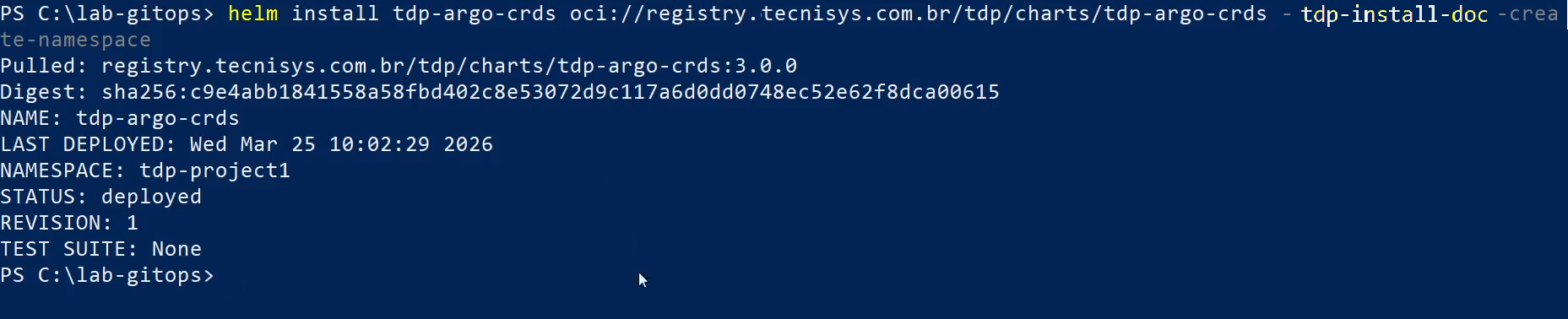
The --create-namespace parameter creates the <NAMESPACE> namespace automatically on first installation. On subsequent installations, the namespace will already exist and the parameter will be ignored.
If the --version flag is omitted, Helm will install the latest chart version available in the registry. To pin a specific chart version, use --version <CHART_VERSION>.
The installed component version (Kafka, Airflow, etc.) is defined by the chart's appVersion and can be checked in the chart before installation or in the deployed resources after installation.
After installing each component, wait for the pods to be ready before proceeding:
kubectl get pods -n <NAMESPACE> --watch

Press Ctrl+C when all component pods are in Running and READY status.
1. Platform CRDs (tdp-crds)
Custom Resource Definitions (CRDs) teach Kubernetes new resource types that it doesn't know about natively. Platform operators (NiFiKop, Strimzi, ArgoCD, ClickHouse, etc.) need these types to be registered with the cluster before they can be installed — without them, Kubernetes cannot create objects like NifiCluster, Kafka or Application.
CRDs are global scope resources (do not belong to a namespace) and are managed in a dedicated chart (tdp-crds) to avoid conflicts during Helm upgrades.
helm upgrade --install <RELEASE_NAME> \
  oci://registry.tecnisys.com.br/tdp/charts/tdp-crds \
  --version <CHART_VERSION> \
  -n <NAMESPACE> \
  --create-namespace \
  -f <VALUES_FILE>
<RELEASE_NAME>)In the installation commands below, <RELEASE_NAME> is the Helm release name of the component. Many teams use the tdp- prefix in line with the chart name (e.g. chart tdp-kafka with release tdp-kafka). Adjust to the convention of your environment.
tdp-crdsThis chart installs the CRDs needed to:
- Argo CD —
Application,ApplicationSet,AppProject - Strimzi Kafka Operator —
Kafka,KafkaConnect,KafkaTopic,KafkaUser,KafkaNodePool, among others - NiFiKop Operator —
NifiCluster,NifiDataflow,NifiUser, among others - Altinity ClickHouse Operator —
ClickHouseInstallation,ClickHouseKeeperInstallation, among others - OpenMetadata OMJob Operator —
OMJob,CronOMJob - cert-manager —
Certificate,ClusterIssuer,Issuer, among others
2. ArgoCD
helm upgrade --install <RELEASE_NAME> \
  oci://registry.tecnisys.com.br/tdp/charts/tdp-argo \
  --version <CHART_VERSION> \
  -n <NAMESPACE> \
  --create-namespace \
  -f <VALUES_FILE>
3. PostgreSQL
helm upgrade --install <RELEASE_NAME> \
  oci://registry.tecnisys.com.br/tdp/charts/tdp-postgresql \
  --version <CHART_VERSION> \
  -n <NAMESPACE> \
  -f <VALUES_FILE>
Wait for PostgreSQL to become fully operational before proceeding with the installation of components that depend on it. Check status:
kubectl get pods -n <NAMESPACE> | grep <RELEASE_NAME>
The pod must have the status Running and have all replicas ready (READY 1/1).
If the PostgreSQL release is tdp-postgresql, the filter can be grep tdp-postgresql on the output of kubectl get pods.
4. Kafka (Strimzi)
tdp-kafka depends on Strimzi CRDs (e.g.: Kafka, KafkaNodePool, KafkaConnect, KafkaConnector) installed by tdp-crds (step 1).
Ensure tdp-crds is applied before installing tdp-kafka.
Without the CRDs, Helm cannot create Strimzi resources and the installation will fail.
helm upgrade --install <RELEASE_NAME> \
  oci://registry.tecnisys.com.br/tdp/charts/tdp-kafka \
  --version <CHART_VERSION> \
  -n <NAMESPACE> \
  --create-namespace \
  -f <VALUES_FILE>
After installation, verify the Kafka cluster was created successfully:
kubectl get kafka -n <NAMESPACE>
kubectl get kafkanodepools -n <NAMESPACE>
kubectl get pods -n <NAMESPACE> -l strimzi.io/cluster=<KAFKA_CLUSTER_NAME>
kubectl get svc -n <NAMESPACE> | grep kafka
kubectl get kafkaconnect -n <NAMESPACE>
kubectl get kafkaconnector -n <NAMESPACE>
Replace <KAFKA_CLUSTER_NAME> with the value of name in values.yaml (default: tdp-kafka).
For tdp-kafka, the chart version (e.g.: 3.0.1) is separate from the appVersion (e.g.: 4.1.0 — Apache Kafka version).
Use helm show chart oci://registry.tecnisys.com.br/tdp/charts/tdp-kafka to check both.
5. Hive Metastore
helm upgrade --install <RELEASE_NAME> \
  oci://registry.tecnisys.com.br/tdp/charts/tdp-hive-metastore \
  --version <CHART_VERSION> \
  -n <NAMESPACE> \
  -f <VALUES_FILE>
6. Delta Lake
helm upgrade --install <RELEASE_NAME> \
  oci://registry.tecnisys.com.br/tdp/charts/tdp-deltalake \
  --version <CHART_VERSION> \
  -n <NAMESPACE> \
  -f <VALUES_FILE>
7. Iceberg
helm upgrade --install <RELEASE_NAME> \
  oci://registry.tecnisys.com.br/tdp/charts/tdp-iceberg \
  --version <CHART_VERSION> \
  -n <NAMESPACE> \
  -f <VALUES_FILE>
8. Apache Ozone
helm upgrade --install <RELEASE_NAME> \
  oci://registry.tecnisys.com.br/tdp/charts/tdp-ozone \
  --version <CHART_VERSION> \
  -n <NAMESPACE> \
  -f <VALUES_FILE>
9. Ranger
helm upgrade --install <RELEASE_NAME> \
  oci://registry.tecnisys.com.br/tdp/charts/tdp-ranger \
  --version <CHART_VERSION> \
  -n <NAMESPACE> \
  -f <VALUES_FILE>
10. NiFi
helm upgrade --install <RELEASE_NAME> \
  oci://registry.tecnisys.com.br/tdp/charts/tdp-nifi \
  --version <CHART_VERSION> \
  -n <NAMESPACE> \
  -f <VALUES_FILE>
11. Spark
helm upgrade --install <RELEASE_NAME> \
  oci://registry.tecnisys.com.br/tdp/charts/tdp-spark \
  --version <CHART_VERSION> \
  -n <NAMESPACE> \
  -f <VALUES_FILE>
12. Trino
helm upgrade --install <RELEASE_NAME> \
  oci://registry.tecnisys.com.br/tdp/charts/tdp-trino \
  --version <CHART_VERSION> \
  -n <NAMESPACE> \
  -f <VALUES_FILE>
13. Airflow
helm upgrade --install <RELEASE_NAME> \
  oci://registry.tecnisys.com.br/tdp/charts/tdp-airflow \
  --version <CHART_VERSION> \
  -n <NAMESPACE> \
  -f <VALUES_FILE>
Airflow requires PostgreSQL to be operational. Additionally, if you use the CeleryExecutor or KubernetesExecutor executor with sharing DAGs via volume, make sure that a Storage Class with ReadWriteMany (RWX) support is available.
14. JupyterHub
helm upgrade --install <RELEASE_NAME> \
  oci://registry.tecnisys.com.br/tdp/charts/tdp-jupyter \
  --version <CHART_VERSION> \
  -n <NAMESPACE> \
  -f <VALUES_FILE>
15. ClickHouse
helm upgrade --install <RELEASE_NAME> \
  oci://registry.tecnisys.com.br/tdp/charts/tdp-clickhouse \
  --version <CHART_VERSION> \
  -n <NAMESPACE> \
  -f <VALUES_FILE>
16. CloudBeaver
helm upgrade --install <RELEASE_NAME> \
  oci://registry.tecnisys.com.br/tdp/charts/tdp-cloudbeaver \
  --version <CHART_VERSION> \
  -n <NAMESPACE> \
  -f <VALUES_FILE>
17. OpenMetadata
helm upgrade --install <RELEASE_NAME> \
  oci://registry.tecnisys.com.br/tdp/charts/tdp-openmetadata \
  --version <CHART_VERSION> \
  -n <NAMESPACE> \
  -f <VALUES_FILE> \
  --wait --wait-for-jobs --timeout 10m
OpenMetadata runs Kubernetes Jobs during installation and upgrade.
The --wait-for-jobs flag instructs Helm to wait for those jobs to complete before considering the installation successful.
Use --wait --wait-for-jobs --timeout 10m to ensure post-installation jobs complete.
In Argo CD, the Application should only be considered healthy after post-installation/upgrade jobs complete.
18. Superset
helm upgrade --install <RELEASE_NAME> \
  oci://registry.tecnisys.com.br/tdp/charts/tdp-superset \
  --version <CHART_VERSION> \
  -n <NAMESPACE> \
  -f <VALUES_FILE>
- Commands
- Videos
Installation Check
After installing all the desired components, check the overall installation status.
Check Pods
kubectl get pods -n <NAMESPACE>
All pods must have Running status with all replicas ready.
Check Helm Releases
helm list -n <NAMESPACE>

All releases must have deployed status.
Check Services
kubectl get svc -n <NAMESPACE>

Check Persistent Volumes
kubectl get pvc -n <NAMESPACE>

All Persistent Volume Claims must have Bound status.
- Check Pods
- Check Helm Releases
- Check Services
- Check Persistent Volumes
Pods Won't Start
If a pod stays in Pending or CrashLoopBackOff status:
-
Check pod events:
Terminal inputkubectl describe pod <pod-name> -n <NAMESPACE> -
Check the pod logs:
Terminal inputkubectl logs <pod-name> -n <NAMESPACE> -
Common causes:
- Insufficient resources: the cluster does not have enough CPU or memory to schedule the pod. Check with
kubectl describe node - PVC pending: the configured Storage Class is not available or does not support the requested access mode
- Unmet dependency: the component depends on PostgreSQL or another service that is not yet operational
- Insufficient resources: the cluster does not have enough CPU or memory to schedule the pod. Check with
Image Pull Error (ImagePullBackOff)
If a pod displays ImagePullBackOff or ErrImagePull status:
-
Check whether registry authentication was performed correctly:
Terminal inputhelm registry login registry.tecnisys.com.br -
Verify that the registry authentication Secret is configured in the namespace:
Terminal inputkubectl get secrets -n <NAMESPACE> | grep registry -
If necessary, create Secret manually:
Terminal inputkubectl delete secret <docker-registry-secret> -n <NAMESPACE> 2>/dev/null || true
kubectl create secret docker-registry <docker-registry-secret> \
--docker-server=registry.tecnisys.com.br \
--docker-username=<username> \
--docker-password=<password> \
-n <NAMESPACE>
      kubectl delete secret tdp-registry-secret -n <NAMESPACE> 2>/dev/null || true
      kubectl create secret docker-registry tdp-registry-secret \
        --docker-server=registry.tecnisys.com.br \
        --docker-username=<username> \
        --docker-password=<password> \
        -n <NAMESPACE>
Database Connection Failed
If components such as Airflow, Superset, Ranger, OpenMetadata or CloudBeaver have database connection errors:
-
Verify that PostgreSQL is operational:
Terminal inputkubectl get pods -n <NAMESPACE> | grep <RELEASE_NAME>
With release tdp-postgresql: kubectl get pods -n <NAMESPACE> | grep tdp-postgresql
-
Check the cluster's internal connectivity:
Terminal inputkubectl run pg-test --rm -it --image=busybox -n <NAMESPACE> -- \
sh -c "nc -zv <postgresql-service> 5432"
When the default chart service exposes the host tdp-postgresql in the namespace:
kubectl run pg-test --rm -it --image=busybox -n <NAMESPACE> -- \
  sh -c "nc -zv tdp-postgresql 5432"
- Check the credentials configured in the values of the component chart
Uninstall a Problem Component
To uninstall and reinstall a specific component:
helm uninstall <RELEASE_NAME> -n <NAMESPACE>
helm upgrade --install <RELEASE_NAME> \
  oci://registry.tecnisys.com.br/tdp/charts/<chart> \
  --version <CHART_VERSION> \
  -n <NAMESPACE> \
  -f <VALUES_FILE>
Uninstalling a Helm release does not remove the associated Persistent Volume Claims (PVCs). For a clean reinstallation, delete the PVCs manually before reinstalling:
kubectl delete pvc <pvc-name> -n <NAMESPACE>