Uninstall
This guide describes how to remove TDP Kubernetes components in an organized and safe way.
Before you start
Distinguish what is being removed:
- components installed directly via Helm
- Applications managed by ArgoCD
- ArgoCD itself, when it is also part of the removal
This document clearly separates each scenario.
Removing Kubernetes resources does not automatically remove persisted data.
PVCs, PVs, snapshots and namespace must be evaluated separately.
Before performing any removal, identify how the component or environment was deployed.
1. Check if the component was installed via Helm
Use this command to discover existing Helm releases in the namespace:
helm list -n <NAMESPACE>

If the component appears in this listing, the main removal is done with helm uninstall.
2. Check if the component is managed by ArgoCD
Use this command to discover Applications managed by ArgoCD:
argocd app list

If the component appears as an ArgoCD Application, the main removal is done with argocd app delete.
Do not mix flows unnecessarily.
If the component is managed by ArgoCD, the main path is to remove the Application.
If it was installed directly via Helm, the main path is to remove the Helm release.
Preparations before removal
Back up data
Before removing any stateful components, back up anything that needs to be preserved.
Common examples:
- PostgreSQL: database dump
- ClickHouse: export of tables and schemas
- Airflow: DAGs, variables and connections
- OpenMetadata: metadata and lineage
- Ranger: relevant policies and settings
Export Helm release configuration
Once the component has been installed via Helm, export the currently applied values:
helm get values <RELEASE_NAME> -n <NAMESPACE> -o yaml > <RELEASE_NAME>-values-backup.yaml

This file typically contains values overwritten during installation or upgrade.
To consult all parameters accepted by the chart, use helm show values on the corresponding chart.
To export the values for all releases in the namespace at once:
for release in $(helm list -n <NAMESPACE> -q); do
  helm get values "$release" -n <NAMESPACE> -o yaml > "${release}-values-backup.yaml"
  echo "$release backup completed"
done
Identify associated PVCs
Before removing the component, verify that there are persistent volumes associated with it:
kubectl get pvc -n <NAMESPACE>

To restrict the query to a specific Helm release:
kubectl get pvc -n <NAMESPACE> -l app.kubernetes.io/instance=<RELEASE_NAME>
Create snapshot of persistent volumes, when supported
If the cluster supports CSI snapshots and there is VolumeSnapshotClass available, create snapshots of the critical PVCs before removal.
Check if the cluster supports snapshots:
kubectl get volumesnapshotclass
Create the snapshot:
kubectl apply -f - <<EOT
apiVersion: snapshot.storage.k8s.io/v1
kind: VolumeSnapshot
metadata:
  name: <pvc-name>-final-snapshot
  namespace: <NAMESPACE>
spec:
  volumeSnapshotClassName: <snapshot-class>
  source:
    persistentVolumeClaimName: <pvc-name>
EOT
Verify the result:
kubectl get volumesnapshot -n <NAMESPACE>
Evaluate CRDs before removing the platform
The tdp-crds chart installs cluster-scoped resources. These resources do not belong to a specific namespace and may remain after removing Helm releases or Argo CD Applications.
Before removing CRDs, confirm that all components that depend on them have already been removed and that no custom resources remain:
kubectl get crd
To evaluate remaining objects, check the types installed by the operators used in the platform, such as Argo CD, Strimzi, NiFiKop, Altinity ClickHouse Operator, OpenMetadata OMJob Operator and cert-manager.
Remove CRDs only during full platform uninstallation or controlled administrative cleanup. Removing a CRD also removes the corresponding custom API and may affect resources that still exist in the cluster.
Remove components
- Via Helm
- Via ArgoCD
- Commands
- Videos
Uninstall an individual component
Use this flow when the component was installed directly as a Helm release.
Uninstall the release
helm uninstall <RELEASE_NAME> -n <NAMESPACE>

Check if release features have been removed
kubectl get all -n <NAMESPACE> -l app.kubernetes.io/instance=<RELEASE_NAME>

This command shows what is still associated with the release after helm uninstall.
If the result is empty, the resources were removed successfully.
Check remaining PVCs
kubectl get pvc -n <NAMESPACE> -l app.kubernetes.io/instance=<RELEASE_NAME>

helm uninstall removes the release and its associated Kubernetes resources — Deployments, StatefulSets, Services, ConfigMaps, and Secrets.
PVCs are normally not removed automatically.
Remove complete environment via Helm
Use this flow when the entire environment has been deployed directly via Helm, without Applications managed by ArgoCD.
Remove releases in reverse dependency order
helm uninstall tdp-superset -n <NAMESPACE>
helm uninstall tdp-openmetadata -n <NAMESPACE>
helm uninstall tdp-cloudbeaver -n <NAMESPACE>
helm uninstall tdp-jupyter -n <NAMESPACE>
helm uninstall tdp-airflow -n <NAMESPACE>
helm uninstall tdp-clickhouse -n <NAMESPACE>
helm uninstall tdp-trino -n <NAMESPACE>
helm uninstall tdp-spark -n <NAMESPACE>
helm uninstall tdp-nifi -n <NAMESPACE>
helm uninstall tdp-ranger -n <NAMESPACE>
helm uninstall tdp-iceberg -n <NAMESPACE>
helm uninstall tdp-deltalake -n <NAMESPACE>
helm uninstall tdp-ozone -n <NAMESPACE>
helm uninstall tdp-hive-metastore -n <NAMESPACE>
Before uninstalling tdp-kafka, verify that there are no pending Strimzi resources in the namespace:
kubectl get kafkas,kafkatopics,kafkausers,kafkaconnects,kafkaconnectors -n <NAMESPACE>
Remove custom resources before uninstalling the chart to avoid orphaned CRDs in the cluster.
helm uninstall tdp-kafka -n <NAMESPACE>
helm uninstall tdp-postgresql -n <NAMESPACE>
helm uninstall tdp-argo -n <NAMESPACE>
helm uninstall tdp-crds -n <NAMESPACE>
Check remaining PVCs
kubectl get pvc -n <NAMESPACE>
Remove PVCs, if removal is permanent
kubectl delete pvc --all -n <NAMESPACE>

Deleting PVCs permanently removes persisted data.
Do this only when disassembly is final and backups are complete.
- helm list
- helm get values
- helm uninstall
- kubectl get pvc
- kubectl get pvc (por release)
- kubectl get all
- kubectl delete pvc
- kubectl delete pvc --all
- kubectl get pv
- Full demo
- Commands
- Videos
Remove an individual component via ArgoCD
Use this flow when the component is managed as an ArgoCD Application.
Remove the Application
argocd app delete <componente> --cascade

Verify removal
argocd app list
Check remaining resources in the namespace
kubectl get all -n <NAMESPACE>

Check remaining PVCs
kubectl get pvc -n <NAMESPACE>
The --cascade option removes the Application and the Kubernetes resources managed by it.
Even so, PVCs, PVs and other infrastructure waste may require additional checking and cleaning.
Remove the complete environment via ArgoCD
Use this path when the TDP environment is fully deployed and managed by ArgoCD.
Option A — Remove a root app of type app-of-apps
If the environment uses a root Application that controls the others, the removal can start with it:
argocd app delete <root-application> --cascade
Use this option only when the app-of-apps model is validated in your environment and you are confident that deleting the root app will correctly remove child applications and their resources.
Option B — Remove Applications individually in reverse order of dependency
When there is no root app, or when you want full control of the disassembly, remove the Applications one by one:
argocd app delete tdp-superset --cascade
argocd app delete tdp-openmetadata --cascade
argocd app delete tdp-cloudbeaver --cascade
argocd app delete tdp-jupyter --cascade
argocd app delete tdp-airflow --cascade
argocd app delete tdp-clickhouse --cascade
argocd app delete tdp-trino --cascade
argocd app delete tdp-spark --cascade
argocd app delete tdp-nifi --cascade
argocd app delete tdp-ranger --cascade
argocd app delete tdp-iceberg --cascade
argocd app delete tdp-deltalake --cascade
argocd app delete tdp-ozone --cascade
argocd app delete tdp-hive-metastore --cascade
argocd app delete tdp-kafka --cascade
argocd app delete tdp-postgresql --cascade
Check for remaining Applications
argocd app list
Check for remaining resources in the namespace
kubectl get all -n <NAMESPACE>
Check remaining PVCs
kubectl get pvc -n <NAMESPACE>
Remove PVCs, if removal is permanent
kubectl delete pvc --all -n <NAMESPACE>
Deleting PVCs permanently removes persisted data.
Do this only when disassembly is final and backups are complete.
Remove ArgoCD infrastructure
This step is separate from removing the TDP environment.
First remove all Applications and workloads managed by ArgoCD.
Only then remove ArgoCD itself, if that is part of the objective.
ArgoCD is removed via Helm regardless of how the TDP environment was managed.
Uninstall ArgoCD releases
helm uninstall tdp-argo -n <NAMESPACE>
helm uninstall tdp-crds -n <NAMESPACE>
helm uninstall tdp-crds does not remove CRDs automatically. CRDs are cluster-scope resources and can be shared by other installations or projects. tdp-crds manages multi-component CRDs (Argo CD, Kafka, NiFiKop, ClickHouse, OpenMetadata and cert-manager) — evaluate carefully before removing them.
Remove CRDs manually (when necessary)
Apply the cleanup job included in the chart:
kubectl apply -f stack/charts/tdp/tdp-crds/cleanup/delete-crds-job.yaml
The Job checks whether there are dependent resources before deleting each CRD — CRDs with resources in use are ignored.
- argocd app delete
- argocd app list
- kubectl get all
Limpeza complementar
Check Persistent Orphan Volumes
After removing the PVCs, check if there are PVs in the Released state:
kubectl get pv | grep <NAMESPACE>
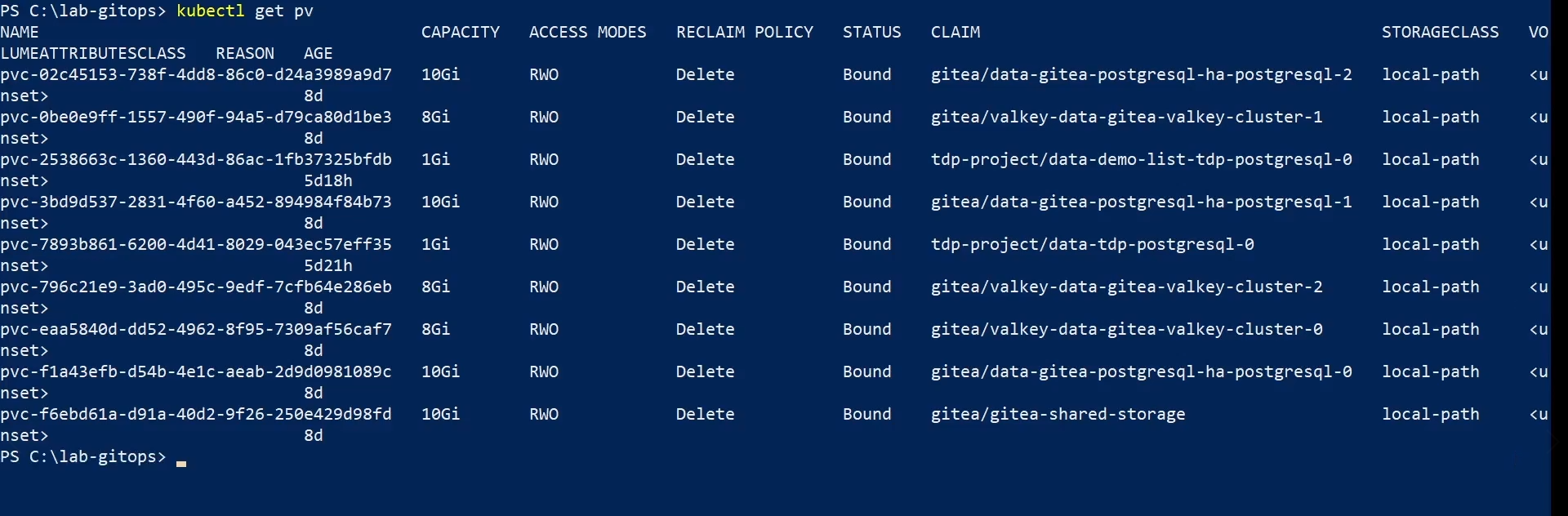
If there are orphaned PVs and you no longer need them:
kubectl delete pv <pv-name>
Remove namespace, when applicable
Only remove the namespace when it is dedicated exclusively to the environment being dismounted.
kubectl delete namespace <NAMESPACE>
Removing the namespace deletes all namespaced resources still in it, including PVCs, ConfigMaps, Secrets, and ServiceAccounts.
If the namespace gets stuck in Terminating, check finalizers:
kubectl get namespace <NAMESPACE> -o json | jq '.spec.finalizers'
To force termination:
kubectl get namespace <NAMESPACE> -o json | jq '.spec.finalizers = []' | \
kubectl replace --raw "/api/v1/namespaces/<NAMESPACE>/finalize" -f -
Final check
After removal, check whether there is anything left in the environment.
Check remaining resources in the namespace
kubectl get all -n <NAMESPACE>
Check remaining Helm releases
helm list -n <NAMESPACE>
Check remaining Applications in ArgoCD
argocd app list
Check remaining PVCs
kubectl get pvc -n <NAMESPACE>
Check remaining PVs
kubectl get pv | grep <NAMESPACE>
Resumo
| Situation | Main path | Note |
|---|---|---|
| Component installed directly via Helm | helm uninstall <RELEASE_NAME> -n <NAMESPACE> | Use when there is actual Helm release |
| Component managed by ArgoCD | argocd app delete <component> --cascade | Removes the Application and managed resources |
| Complete removal from ArgoCD managed environment | argocd app delete ... --cascade in reverse order, or root app removal | PVCs and PVs may require manual cleaning |
| Removal of ArgoCD itself | helm uninstall tdp-argo -n <NAMESPACE> | It must occur after removing the Applications |
| Complete removal of the installed environment via Helm | sequence of helm uninstall in reverse order | Separate flow from ArgoCD model |
| Persistent data cleaning | kubectl delete pvc... and, if necessary, kubectl delete pv... | Manual and destructive step |
| Namespace cleanup | kubectl delete namespace <NAMESPACE> | Only when the namespace is dedicated to the removed environment |