Installation via Argo CD
Before you start, make sure the prerequisites have been met.
If Argo CD is not yet installed, Step 4 below (Option A, deploy.sh --install) installs it automatically — together with the GitOps bootstrap. If it's already installed, use Option B (deploy.sh -c).
To install the components manually, without GitOps, see the Helm installation.
Overview
Argo CD installs components from YAML files called Applications. Each TDP component — PostgreSQL, Kafka, Airflow, Trino, etc. — is represented by an Application file that instructs Argo CD to pull the corresponding chart from the Tecnisys registry and install it in the cluster.
These files live in a Git repository. Argo CD continuously monitors that repository and syncs the cluster state with what is declared — without running commands on every change.
Difference between installing with Argo CD and Helm
| Criterion | Helm CLI | Argo CD (GitOps) |
|---|---|---|
| Traceability | Manual commands, no automatic history | Every change is recorded in Git |
| Automation | Manual execution of each chart | Continuous automatic synchronization |
| Rollback | Requires re-running commands | One click or one command |
| Visibility | Terminal only | Web interface with real-time status |
| Auditing | Difficult | Complete, via Git history |
GitOps repository structure
The current implementation uses a directory structure optimized for GitOps:
tdp-gitops/
├── common/                          # Bootstrap resources (AppProject, Secrets, App of Apps)
│   ├── argo-gitops-appproject.yaml
│   ├── argo-gitops-app-of-apps.yaml
│   ├── tdp-devops-repo-secret.yaml
│   └── tdp-registry-secret.yaml
├── available/                       # Application templates (with variables)
│   ├── tdp-postgresql/
│   │   ├── tdp-postgresql.yaml
│   │   └── values.yaml
│   ├── tdp-kafka/
│   └── ...
├── current/                         # Rendered manifests (committed to git)
│   ├── common/
│   ├── tdp-postgresql/
│   └── ...
├── variables.env                    # Environment variables (do not commit)
├── deploy.sh                        # Automation script
└── README.md
How it works:
available/contains templates with variables (${VAR}) — never applied directly.deploy.shrendersavailable/+common/→current/substituting the variables.current/is committed to git and monitored by the Argo CD App of Apps.common/contains the bootstrap resources (AppProject, Secrets, App of Apps).
Essential concepts
Manifest: A YAML file that describes a Kubernetes or Argo CD resource. In this context, each manifest defines an Argo CD Application — that is, it instructs Argo CD to install a given Helm chart.
Application: The central Argo CD object. It directs Argo CD to pull a given Helm chart from the Registry and install it in a given cluster namespace. Each TDP component is represented by a separate Application.
Repository (in the Argo CD context): The origin of the artifacts Argo CD will use. It can be a Git repository (where the manifests live) or an OCI1 registry (where the Tecnisys Helm Charts live).
Synchronization: The process by which Argo CD compares the state declared in the manifests with the cluster's actual state and applies the required changes.
App of Apps: A pattern that lets you manage all components with a single root Application, which automatically discovers and installs all the others.
Installation order
When the App of Apps is applied, Argo CD tries to sync all components at the same time. Therefore, components without dependencies must be stable before the dependent ones try to connect to them. The table below shows this order and each chart's dependencies:
| Order | Chart | Component | Version | Dependencies |
|---|---|---|---|---|
| 1 | tdp-postgresql | PostgreSQL | 17.5.0 | None |
| 2 | tdp-kafka | Kafka (Strimzi) | 4.1.0 | tdp-crds (Strimzi CRDs) |
| 3 | tdp-hive-metastore | Hive Metastore | 4.0.0 | tdp-postgresql |
| 4 | tdp-deltalake | Delta Lake | 4.0.1 | None |
| 5 | tdp-iceberg | Iceberg | 1.10.0 | None |
| 6 | tdp-ozone | Apache Ozone | 2.0.0 | None |
| 7 | tdp-ranger | Ranger | 2.7.0 | tdp-postgresql |
| 8 | tdp-nifi | NiFi | 1.28.0 | None |
| 9 | tdp-spark | Spark | 4.0.2 | None |
| 10 | tdp-trino | Trino | 478 | None |
| 11 | tdp-airflow | Airflow | 3.0.2 | tdp-postgresql |
| 12 | tdp-jupyter | JupyterHub | 5.3.0 | tdp-postgresql |
| 13 | tdp-clickhouse | ClickHouse | 25.8.11.66 | tdp-crds (Altinity CRDs) |
| 14 | tdp-cloudbeaver | CloudBeaver | 25.3.0 | tdp-postgresql |
| 15 | tdp-openmetadata | OpenMetadata | 1.12.4 | tdp-postgresql |
| 16 | tdp-superset | Superset | 5.0.0 | tdp-postgresql |
The Version column refers to the component version (e.g., Kafka 4.1.0, Airflow 3.0.2). The Helm chart version is 3.0.1 for all TDP charts.
Prerequisites
| Tool | Required for |
|---|---|
kubectl (configured for the cluster) | deploy, bootstrap |
envsubst (gettext package) | template rendering |
git | GitOps mode (push current/) |
helm | Argo CD bootstrap (--install) |
- Installation Steps
- Installation Verification
- Troubleshooting
- Update Chart Version
- Commands
- Videos
Step 1 – Get the GitOps repository
Clone (or fork) the GitOps repository and enter the folder:
git clone <GITOPS_REPO_URL>
cd tdp-gitops

Step 2 – Configure environment variables
Copy the reference file and edit it with your values:
cp variables.env variables.env.local
vim variables.env.local
Required variables in variables.env.local:
# Namespace where Argo CD is installed
ARGOCD_NAMESPACE=argocd

# Target namespace for the TDP pods
TDP_NAMESPACE=<NAMESPACE>

# Namespace where the Argo CD Applications are created
TDP_PROJECT_NAMESPACE=<NAMESPACE>

# Name of the "App of Apps" Application
TDP_APPLICATIONS=argo-gitops-tdp-project

# URL of this git repository (used by Argo CD to monitor current/)
GIT_REPO_URL=<GITOPS_REPO_URL>
GIT_REPO_USER=<GIT_USERNAME>
GIT_REPO_TOKEN_OR_PASS=<GIT_TOKEN>

# Helm OCI registry with the TDP charts
HELM_CHART_REPO_URL=registry.tecnisys.com.br/tdp/charts
HELM_CHART_VERSION=<TDP_K8S_RELEASE>

# Kubernetes server (use the default for in-cluster)
KUBERNETES_SERVER=https://kubernetes.default.svc

# Helm OCI registry credentials
TECNISYS_HELM_REGISTRY_USER=<REGISTRY_USERNAME>
TECNISYS_HELM_REGISTRY_TOKEN=<REGISTRY_CLI_SECRET>
For HELM_CHART_VERSION, use the current release version: 3.0.1.
variables.env.local is in .gitignore — never commit tokens or passwords.
Step 3 – Configure Argo CD to manage Applications in a separate namespace
The Applications live in the <NAMESPACE> namespace (set in TDP_PROJECT_NAMESPACE), not in the argocd namespace.
Configure Argo CD to manage that namespace through the application.namespaces parameter — see Argo CD configuration → Application namespaces.
Step 4 – Argo CD bootstrap
The deploy.sh script automates the Argo CD installation and the GitOps bootstrap.
Option A: Full bootstrap — installs Argo CD (recommended)
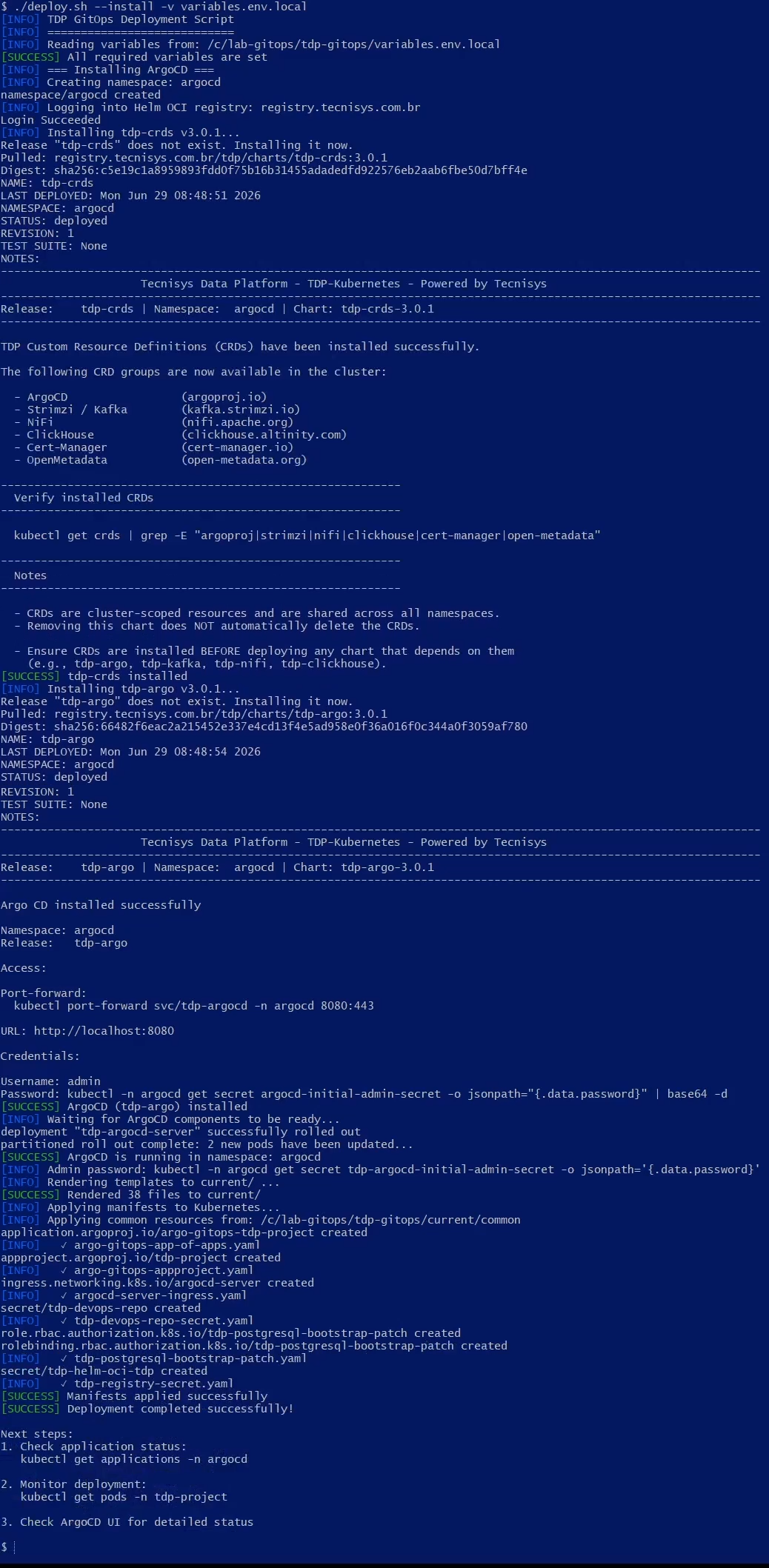
Installs Argo CD (tdp-crds + tdp-argo) via Helm OCI, waits for the pods to be ready, renders the templates, and applies the common resources:
./deploy.sh --install -v variables.env.local
What is executed:
helm registry login→ authenticates to the OCI registryhelm upgrade --install tdp-crds→ installs the Argo CD CRDshelm upgrade --install tdp-argo→ installs Argo CDkubectl rollout status→ waits forargocd-serverandapplication-controllerenvsubston all templates → populatescurrent/kubectl applyon the files incurrent/common/:argo-gitops-appproject.yaml— TDP AppProjecttdp-devops-repo-secret.yaml— git credential for Argo CDtdp-registry-secret.yaml— Helm OCI registry credentialargo-gitops-app-of-apps.yaml— "App of Apps" Application
Option B: GitOps only — Argo CD already installed
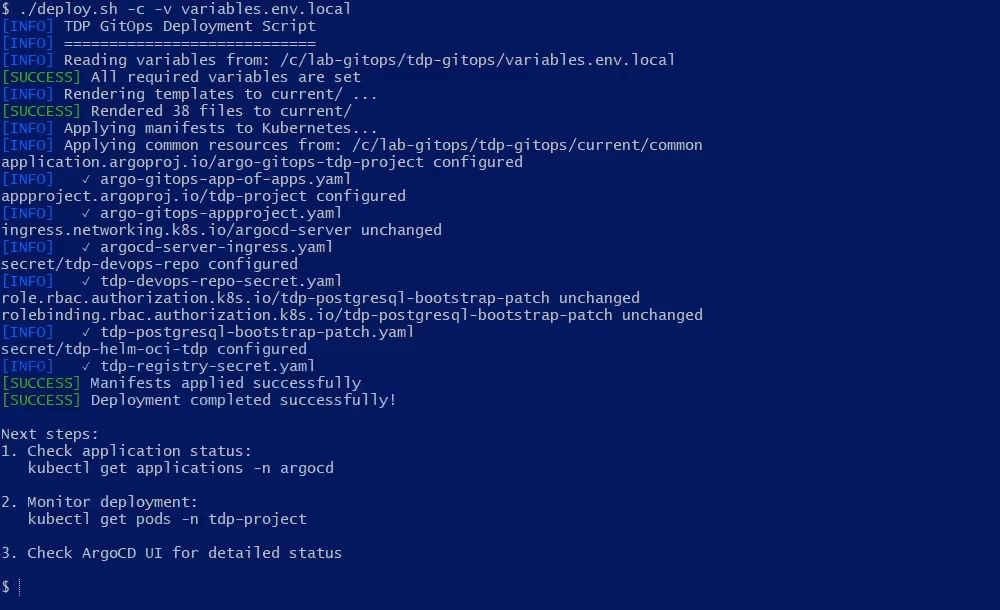
If Argo CD is already installed, just render and apply the common resources:
./deploy.sh -c -v variables.env.local
Step 5 – Commit and publish current/ to Git
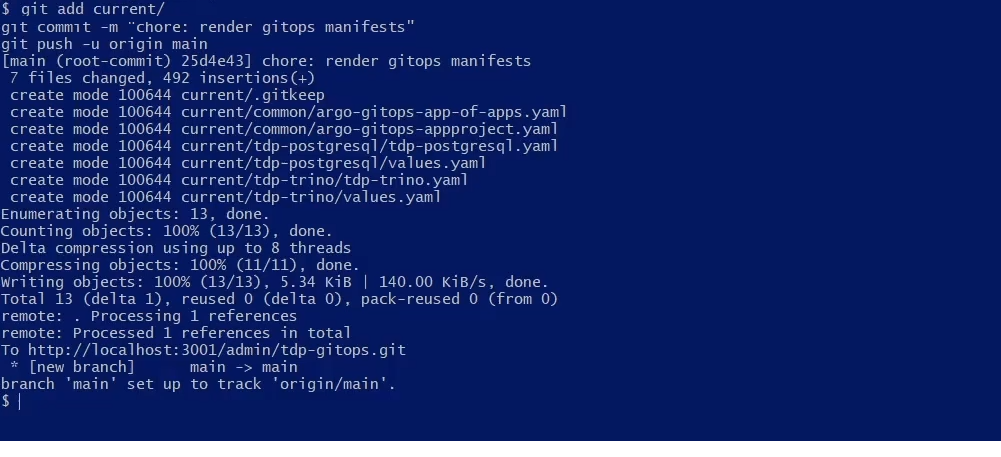
The App of Apps reads current/ directly from the git repository. The files must be published:
git add current/
git commit -m "chore: render gitops manifests"
git push origin main
The App of Apps will automatically create all Applications present in current/ with selfHeal: true.
Step 6 – Follow the synchronization
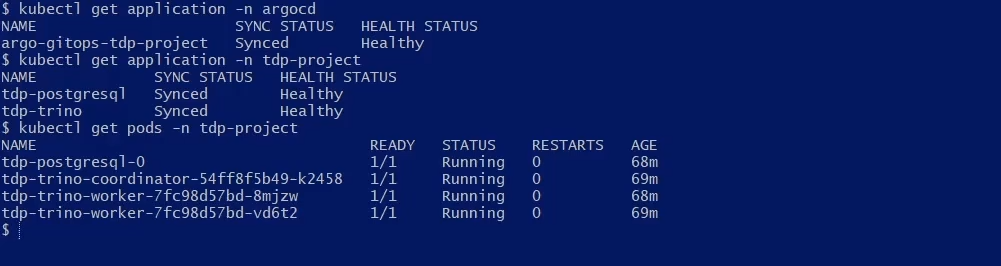
Verify the status
# App-of-Apps Application (argocd namespace)
kubectl get application -n argocd

# Applications created (TDP components namespace)
kubectl get application -n <NAMESPACE>

# Pods in the components namespace
kubectl get pods -n <NAMESPACE>

# Argo CD admin initial password
kubectl -n argocd get secret argocd-initial-admin-secret \
  -o jsonpath='{.data.password}' | base64 -d && echo
Via the web interface
Access the Argo CD interface:
kubectl get ingress -n argocd
# or
kubectl get httproute -n argocd

Navigate to the Application configured in TDP_APPLICATIONS and follow the progress.
Understanding the Application manifest
Each component uses a parameterized template. Example (rendered):
apiVersion: argoproj.io/v1alpha1
kind: Application
metadata:
  name: tdp-postgresql
  namespace: <NAMESPACE>
  labels:
    tecnisys.io/cluster: tdp
  finalizers:
    - resources-finalizer.argocd.argoproj.io
spec:
  project: <NAMESPACE>
  source:
    repoURL: registry.tecnisys.com.br/tdp/charts
    targetRevision: <TDP_K8S_RELEASE>
    chart: tdp-postgresql
    helm:
      valueFiles:
        - values.yaml
  destination:
    server: https://kubernetes.default.svc
    namespace: <NAMESPACE>
  syncPolicy:
    automated:
      prune: true
      selfHeal: true
    syncOptions:
      - CreateNamespace=true
      - RespectIgnoreDifferences=true
  ignoreDifferences:
    - group: ""
      kind: Secret
      jqPathExpressions:
        - ".data"
Important fields:
metadata.namespace— namespace where the Application is created (TDP_PROJECT_NAMESPACE)spec.project— AppProject that defines the permissions (TDP_NAMESPACE)spec.source.repoURL— OCI registry of the TDP chartsspec.source.chart— chart namespec.destination.namespace— namespace where the pods are created (TDP_NAMESPACE)syncPolicy.automated— automatic synchronizationignoreDifferences— ignores changes to Secrets (avoids password flapping)
Component customization
Each component has a values.yaml in available/<component>/:
# Edit the component values
vim available/tdp-postgresql/values.yaml

# Re-render
./deploy.sh -v variables.env.local -p

# Commit and publish
git add current/tdp-postgresql/
git commit -m "chore: update postgresql values"
git push origin main
deploy.sh: full reference
./deploy.sh [OPTIONS] [COMPONENTS...]
| Flag | Description |
|---|---|
--install | First installation: helm login → tdp-crds → tdp-argo → wait ready → render → apply common |
-v FILE | Use a custom variables file (default: variables.env) |
-p | Render available/ → current/ only (without applying) |
-c | Apply only the common resources (current/common/) via kubectl |
-a | Render + apply components via kubectl (does not apply common) |
-h | Show help |
Examples:
# Full first installation (installs Argo CD + bootstrap)
./deploy.sh --install -v variables.env.local

# Re-render templates and publish (GitOps mode)
./deploy.sh -p -v variables.env.local
git add current/ && git commit -m "chore: render" && git push

# Re-apply only the common resources (AppProject, Secrets, App of Apps)
./deploy.sh -c -v variables.env.local

# Direct deploy of a component (without git push)
./deploy.sh -a tdp-postgresql -v variables.env.local

# Direct deploy of multiple components
./deploy.sh -a tdp-postgresql tdp-trino -v variables.env.local
- Step 1 – Get repo
- Step 4 – Full bootstrap
- Step 4 – Manual bootstrap
- Step 5 – Commit & push
- Step 6 – Status
- Step 6 – Web interface
Installation verification
- Commands
- Videos
Check the Applications status
argocd app list

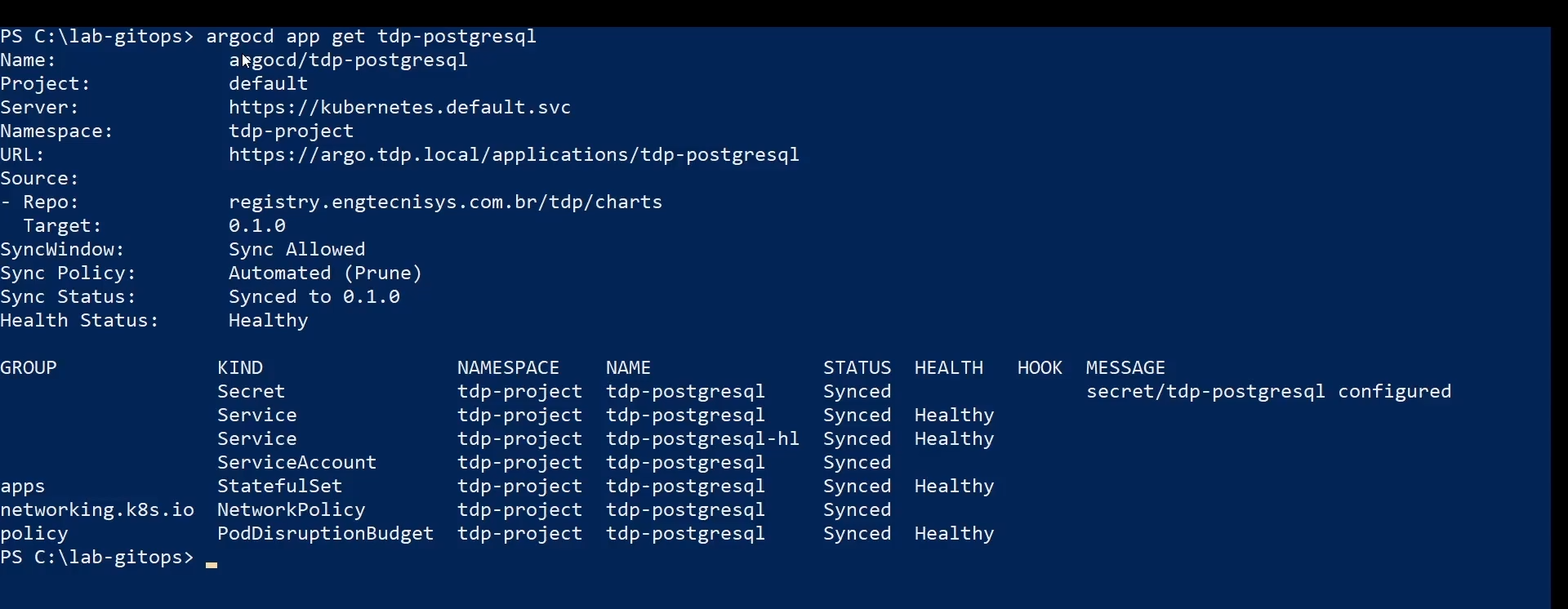
Check a specific Application
argocd app get tdp-postgresql
Check the Pods in the cluster
kubectl get pods -n <NAMESPACE>

All pods must show Running status with all replicas ready.
Check the Services
kubectl get svc -n <NAMESPACE>

Check the Persistent Volumes
kubectl get pvc -n <NAMESPACE>

All Persistent Volume Claims must show Bound status.
- argocd app list
- argocd app get
- kubectl get pods
- kubectl get svc
- kubectl get pvc
Troubleshooting
Application in OutOfSync or Degraded
If an Application shows OutOfSync or Degraded status:
-
Check the Application details:
Terminal inputargocd app get <component> -
Check the pod events and logs:
Terminal inputkubectl describe pod <pod-name> -n <NAMESPACE>
kubectl logs <pod-name> -n <NAMESPACE> -
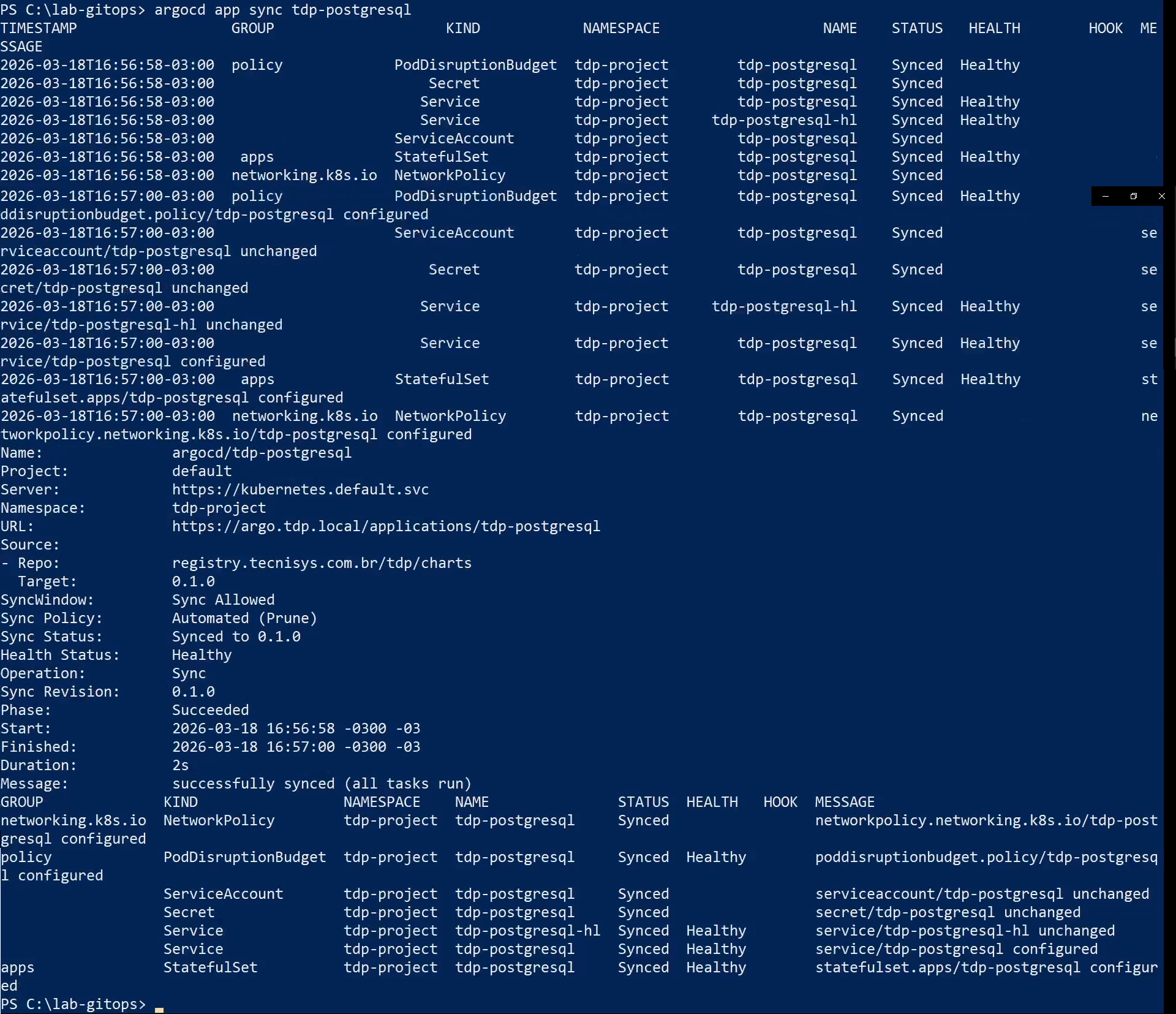
Try to sync manually:
Terminal inputargocd app sync <component>
OCI registry access error
If Argo CD shows an error when trying to pull a chart:
-
Check whether the registry secret was applied:
Terminal inputkubectl get secret tdp-helm-oci-tdp -n argocd -o yaml -
The credentials may have expired. Re-apply the common resources:
Terminal input./deploy.sh -c -v variables.env.local -
Check the cluster connectivity to the registry:
Terminal inputkubectl run test-dns --rm -it --image=busybox -n <NAMESPACE> -- \
sh -c "nslookup registry.tecnisys.com.br"
Components depending on PostgreSQL failing
If Airflow, Superset, Ranger, OpenMetadata, or CloudBeaver show failures:
-
Check whether PostgreSQL is operational:
Terminal inputkubectl get pods -n <NAMESPACE> | grep tdp-postgresql -
If PostgreSQL is not
Runningyet, wait. Argo CDselfHealwill reconcile the dependent components automatically. -
To force the reconciliation manually:
Terminal inputargocd app sync tdp-airflow
Application in the wrong namespace
Applications must be in the <NAMESPACE> namespace (set in TDP_PROJECT_NAMESPACE), not in argocd. Confirm that the argocd-cm has application.namespaces configured for the project namespace (see Step 3).
Sync debug
# View the Application events
kubectl describe application <component> -n <NAMESPACE>

# Application controller logs
kubectl logs -n argocd -l app.kubernetes.io/name=argocd-application-controller --tail=100

# Force reconciliation
kubectl annotate application <component> -n <NAMESPACE> \
  argocd.argoproj.io/refresh=hard --overwrite
Application rollback
Argo CD keeps a synchronization history. To roll back:
-
Via the web interface: select the Application → History and Rollback → choose the revision → Rollback.
-
Via CLI:
Terminal input# List the history
argocd app history <component>
# Roll back to a specific revision
argocd app rollback <component> <revision-id>
When rolling back a component that depends on PostgreSQL, verify that the database version is compatible with the component version being reverted.
Update the chart version
# 1. Update HELM_CHART_VERSION in variables.env.local
vim variables.env.local

# 2. Re-render
./deploy.sh -v variables.env.local -p

# 3. Commit
git add current/
git commit -m "chore: bump chart version"
git push origin main
After the push, Argo CD detects the change in current/ and updates the components automatically.
ArgoCD compatibility
All TDP charts were adjusted for full Argo CD compatibility:
- Single-source: Applications use only the OCI source (no multi-source).
- ignoreDifferences: Secrets ignored to avoid password flapping.
- Check-or-reuse: credentials reused when they already exist (no rotation on sync).
- Separate namespace: Applications in
TDP_PROJECT_NAMESPACE. - Sync waves: correct ordering of dependent resources.
Components with specific Argo CD fixes:
- tdp-jupyter: password rotation fix in
db-create-job - tdp-trino: removal of deletable hooks (PVC/Job)
- tdp-hive-metastore: password rotation fix + security context
- tdp-superset: Bitnami PostgreSQL
randAlphaNumfix - tdp-clickhouse: cleanup job disabled by default
- tdp-airflow: removal of lookup in secrets
Security
variables.env.localis in.gitignore— never commit tokens or passwords.- Use Kubernetes Secrets for sensitive data at runtime.
- Rotate the git and registry tokens regularly.
TDP_PROJECT_NAMESPACEmust have restricted RBAC.- The registry and git Secrets are versioned as templates in
common/(populated fromvariables.env.local).
Available components
| Component | Description | Dependencies |
|---|---|---|
tdp-postgresql | PostgreSQL | — |
tdp-trino | Trino SQL engine | — |
tdp-airflow | Apache Airflow | PostgreSQL |
tdp-clickhouse | ClickHouse | — |
tdp-cloudbeaver | CloudBeaver UI | PostgreSQL |
tdp-deltalake | Delta Lake | — |
tdp-hive-metastore | Hive Metastore | PostgreSQL |
tdp-iceberg | Apache Iceberg | — |
tdp-jupyter | JupyterHub | — |
tdp-kafka | Apache Kafka (Strimzi) | — |
tdp-nifi | Apache NiFi | — |
tdp-openmetadata | OpenMetadata | PostgreSQL |
tdp-ozone | Apache Ozone S3 | — |
tdp-ranger | Apache Ranger | — |
tdp-spark | Apache Spark | — |
tdp-superset | Apache Superset | PostgreSQL |
Footnotes
-
OCI (Open Container Initiative) is the modern standard for storing not only container images but also Helm packages. That is why, when registering the registry, you must check the Enable OCI option — without it, Argo CD will try to treat the address as a conventional
index.yaml-based Helm repository and the connection will fail. ↩