Update via Helm
This guide describes the process of upgrading TDP Kubernetes components using the Helm CLI.
Updating via Helm allows you to apply new versions of charts, update configurations and ensure that the environment is always aligned with the most recent versions.
- Preparation
- Update
- Validation
- Troubleshooting
Update Preparation
Before starting any update, perform the checks below to ensure a safe process.
- Commands
- Videos
Check Current Versions
List all releases installed in the namespace to identify current versions:
helm list -n <NAMESPACE>

The output will display the release name, namespace, revision, status, chart, and application version.
Check pods and workload readiness
Verify that your workloads are ready in the target namespace before proceeding:
kubectl get pods -n <NAMESPACE>
kubectl get statefulset -n <NAMESPACE>


If the application uses Deployment, also validate:
kubectl get deploy -n <NAMESPACE>
What to validate:
- The pods are in
STATUSRunning - Pods
READYcolumn is complete, for example1/1 - The application's StatefulSets or Deployments show all ready replicas, for example
1/1,2/2or3/3
Why validate before updating:
- Ensure that the application is already stable before the change
- Avoid confusing previous failure with failure caused by the update
- Reduce the risk of unavailability during the process
Backup of Current Values
Export the current values for each release to enable rollback in case of failure:
helm get values <RELEASE_NAME> -n <NAMESPACE> -o yaml > <RELEASE_NAME>-values-backup.yaml
Repeat this command for each release that will be updated.
Backup of Persistent Volumes
Before any update, perform a backup of persistent data. In case of a severe failure, these backups will be required for recovery.
-
Identify the component PVCs:
Terminal inputkubectl get pvc -n <NAMESPACE> -l app.kubernetes.io/instance=<RELEASE_NAME> Figure 4 - Get Pvc
 -
Create snapshots of the persistent volumes (if the StorageClass supports it):
Terminal inputkubectl apply -f - <<EOF
apiVersion: snapshot.storage.k8s.io/v1
kind: VolumeSnapshot
metadata:
name: <RELEASE_NAME>-snapshot
namespace: <NAMESPACE>
spec:
volumeSnapshotClassName: <snapshot-class>
source:
persistentVolumeClaimName: <pvc-name>
EOF -
Check the snapshot status:
Terminal inputkubectl get volumesnapshot -n <NAMESPACE>
Update of CRDs
CRDs must be updated before other components. These are global scope resources within the cluster and are not automatically managed by Helm during upgrade.
Update platform CRDs (tdp-crds) before any other components:
helm upgrade --install <RELEASE_NAME> \
  oci://registry.tecnisys.com.br/tdp/charts/tdp-crds \
  -n <NAMESPACE> --create-namespace
            helm upgrade --install tdp-crds \
              oci://registry.tecnisys.com.br/tdp/charts/tdp-crds \
              -n <NAMESPACE> --create-namespace

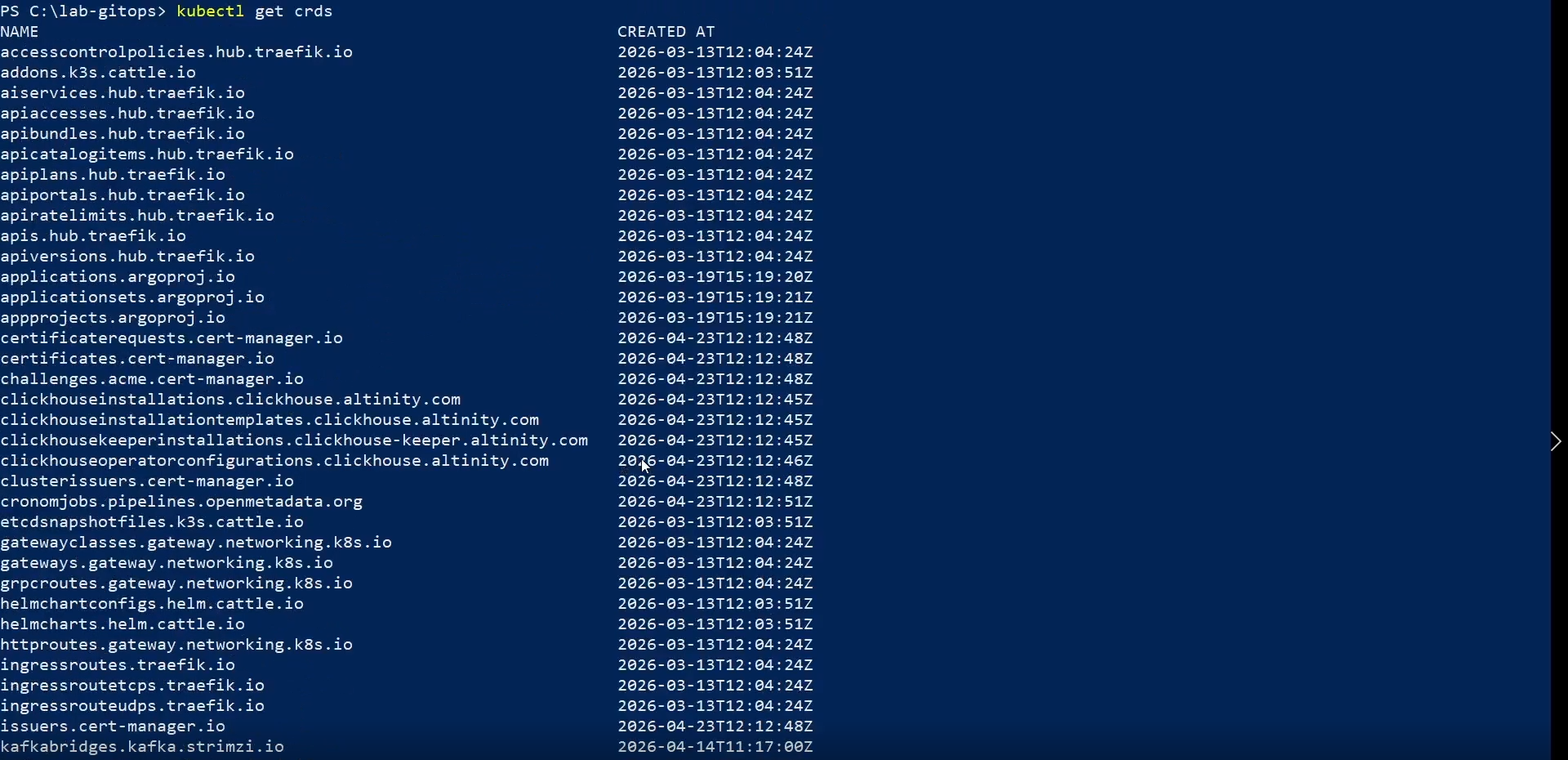
Wait for it to complete and check if the CRDs have been updated:
kubectl get crds | grep argoproj.io
Check history:
helm history <RELEASE_NAME> -n <NAMESPACE>
Command used in the captures of this documentation:
helm history demo-postgresql -n tdp-install-doc

- helm-list
- get-pods
- get-statefulset
- get-pvc-before
- helm-upgrade-tdp-crds
- get-crds
- helm-history
Component Update
- Commands
- Videos
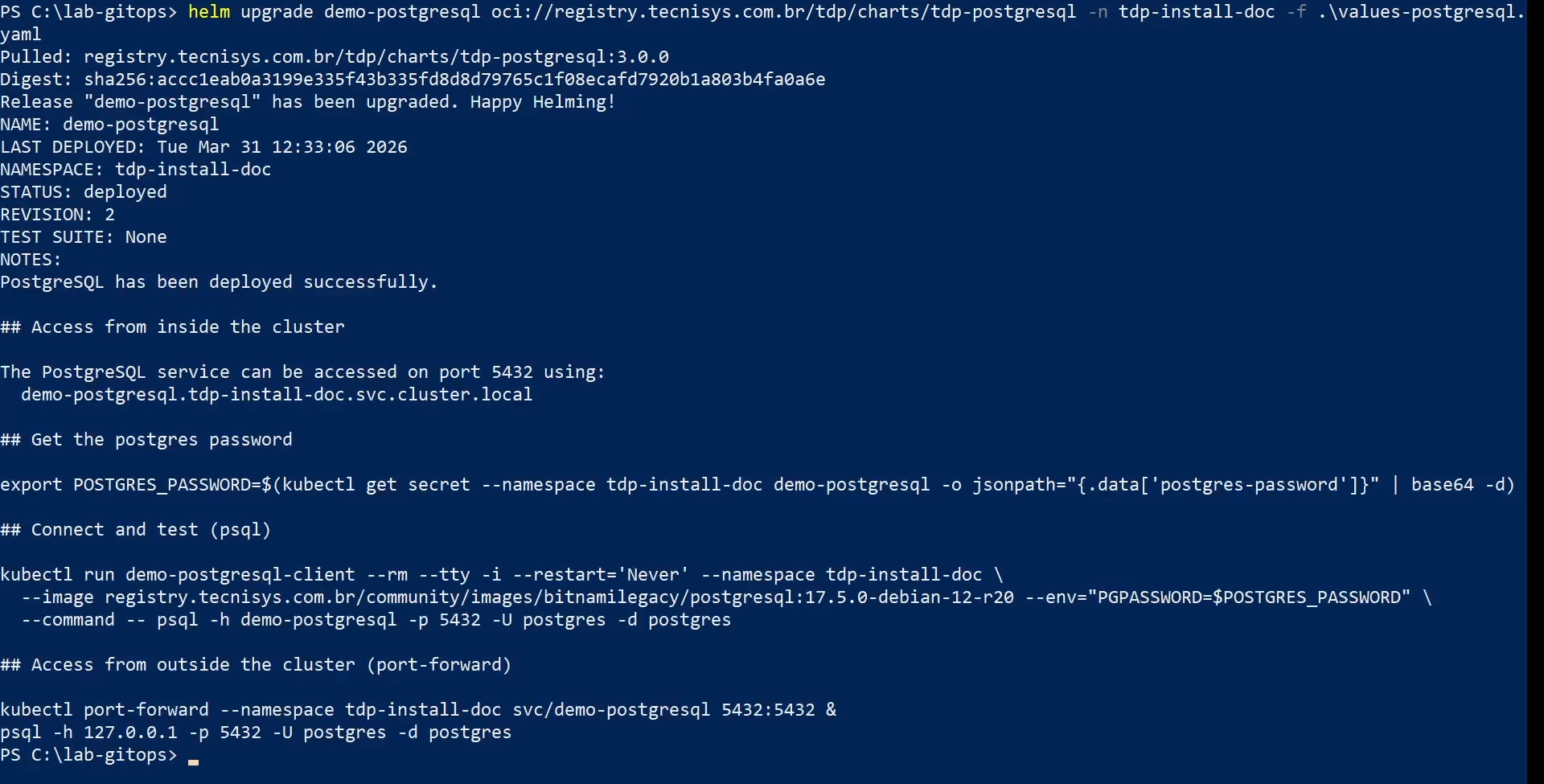
Update Command
The default command to update a TDP Kubernetes component is:
helm upgrade <RELEASE_NAME> oci://registry.tecnisys.com.br/tdp/charts/<chart> \
  -n <NAMESPACE> \
  -f values.yaml
Where:
<RELEASE_NAME>: Helm release name (e.g.tdp-kafka,tdp-trino)<chart>: name of the chart in the registry (e.g.:tdp-kafka,tdp-trino)values.yaml: file with the component's custom settings
Recommended Update Order
Before upgrading, consult the TDP Release Notes to check compatibility between chart versions. If in doubt, contact Tecnisys support.
Respect the order below to ensure that dependencies are met. In each command, replace <RELEASE_NAME> with the Helm release name of that chart (many teams use the tdp- prefix the same as the chart name).
- CRDs and Infrastructure
helm upgrade --install <RELEASE_NAME> oci://registry.tecnisys.com.br/tdp/charts/tdp-crds -n <NAMESPACE> --create-namespace
helm upgrade <RELEASE_NAME> oci://registry.tecnisys.com.br/tdp/charts/tdp-argo -n <NAMESPACE> -f values-argo.yaml
                helm upgrade --install tdp-crds oci://registry.tecnisys.com.br/tdp/charts/tdp-crds -n <NAMESPACE> --create-namespace
                helm upgrade tdp-argo oci://registry.tecnisys.com.br/tdp/charts/tdp-argo -n <NAMESPACE> -f values-argo.yaml
-
Database
Terminal inputhelm upgrade <RELEASE_NAME> oci://registry.tecnisys.com.br/tdp/charts/tdp-postgresql -n <NAMESPACE> -f values-postgresql.yaml
helm upgrade tdp-postgresql oci://registry.tecnisys.com.br/tdp/charts/tdp-postgresql -n <NAMESPACE> -f values-postgresql.yaml
- Messaging
helm upgrade <RELEASE_NAME> oci://registry.tecnisys.com.br/tdp/charts/tdp-kafka -n <NAMESPACE> -f values-kafka.yaml
helm upgrade tdp-kafka oci://registry.tecnisys.com.br/tdp/charts/tdp-kafka -n <NAMESPACE> -f values-kafka.yaml
-
Storage and Metadata Layer
Terminal inputhelm upgrade <RELEASE_NAME> oci://registry.tecnisys.com.br/tdp/charts/tdp-hive-metastore -n <NAMESPACE> -f values-hive-metastore.yaml
helm upgrade <RELEASE_NAME> oci://registry.tecnisys.com.br/tdp/charts/tdp-iceberg -n <NAMESPACE> -f values-iceberg.yaml
helm upgrade <RELEASE_NAME> oci://registry.tecnisys.com.br/tdp/charts/tdp-ozone -n <NAMESPACE> -f values-ozone.yaml
helm upgrade <RELEASE_NAME> oci://registry.tecnisys.com.br/tdp/charts/tdp-deltalake -n <NAMESPACE> -f values-deltalake.yaml
                helm upgrade tdp-hive-metastore oci://registry.tecnisys.com.br/tdp/charts/tdp-hive-metastore -n <NAMESPACE> -f values-hive-metastore.yaml
                helm upgrade tdp-iceberg oci://registry.tecnisys.com.br/tdp/charts/tdp-iceberg -n <NAMESPACE> -f values-iceberg.yaml
                helm upgrade tdp-ozone oci://registry.tecnisys.com.br/tdp/charts/tdp-ozone -n <NAMESPACE> -f values-ozone.yaml
                helm upgrade tdp-deltalake oci://registry.tecnisys.com.br/tdp/charts/tdp-deltalake -n <NAMESPACE> -f values-deltalake.yaml
-
Security and Governance
Terminal inputhelm upgrade <RELEASE_NAME> oci://registry.tecnisys.com.br/tdp/charts/tdp-ranger -n <NAMESPACE> -f values-ranger.yaml
helm upgrade tdp-ranger oci://registry.tecnisys.com.br/tdp/charts/tdp-ranger -n <NAMESPACE> -f values-ranger.yaml
-
Processing and Ingestion
Terminal inputhelm upgrade <RELEASE_NAME> oci://registry.tecnisys.com.br/tdp/charts/tdp-nifi -n <NAMESPACE> -f values-nifi.yaml
helm upgrade <RELEASE_NAME> oci://registry.tecnisys.com.br/tdp/charts/tdp-spark -n <NAMESPACE> -f values-spark.yaml
helm upgrade <RELEASE_NAME> oci://registry.tecnisys.com.br/tdp/charts/tdp-trino -n <NAMESPACE> -f values-trino.yaml
helm upgrade <RELEASE_NAME> oci://registry.tecnisys.com.br/tdp/charts/tdp-clickhouse -n <NAMESPACE> -f values-clickhouse.yaml
                helm upgrade tdp-nifi oci://registry.tecnisys.com.br/tdp/charts/tdp-nifi -n <NAMESPACE> -f values-nifi.yaml
                helm upgrade tdp-spark oci://registry.tecnisys.com.br/tdp/charts/tdp-spark -n <NAMESPACE> -f values-spark.yaml
                helm upgrade tdp-trino oci://registry.tecnisys.com.br/tdp/charts/tdp-trino -n <NAMESPACE> -f values-trino.yaml
                helm upgrade tdp-clickhouse oci://registry.tecnisys.com.br/tdp/charts/tdp-clickhouse -n <NAMESPACE> -f values-clickhouse.yaml
- Tools and Interfaces
helm upgrade <RELEASE_NAME> oci://registry.tecnisys.com.br/tdp/charts/tdp-airflow -n <NAMESPACE> -f values-airflow.yaml
helm upgrade <RELEASE_NAME> oci://registry.tecnisys.com.br/tdp/charts/tdp-jupyter -n <NAMESPACE> -f values-jupyter.yaml
helm upgrade <RELEASE_NAME> oci://registry.tecnisys.com.br/tdp/charts/tdp-superset -n <NAMESPACE> -f values-superset.yaml
helm upgrade <RELEASE_NAME> oci://registry.tecnisys.com.br/tdp/charts/tdp-openmetadata -n <NAMESPACE> -f values-openmetadata.yaml
helm upgrade <RELEASE_NAME> oci://registry.tecnisys.com.br/tdp/charts/tdp-cloudbeaver -n <NAMESPACE> -f values-cloudbeaver.yaml
                helm upgrade tdp-airflow oci://registry.tecnisys.com.br/tdp/charts/tdp-airflow -n <NAMESPACE> -f values-airflow.yaml
                helm upgrade tdp-jupyter oci://registry.tecnisys.com.br/tdp/charts/tdp-jupyter -n <NAMESPACE> -f values-jupyter.yaml
                helm upgrade tdp-superset oci://registry.tecnisys.com.br/tdp/charts/tdp-superset -n <NAMESPACE> -f values-superset.yaml
                helm upgrade tdp-openmetadata oci://registry.tecnisys.com.br/tdp/charts/tdp-openmetadata -n <NAMESPACE> -f values-openmetadata.yaml
                helm upgrade tdp-cloudbeaver oci://registry.tecnisys.com.br/tdp/charts/tdp-cloudbeaver -n <NAMESPACE> -f values-cloudbeaver.yaml
Update with Custom Values
To update a component by applying additional values, use --set in conjunction with the values file:
helm upgrade <RELEASE_NAME> oci://registry.tecnisys.com.br/tdp/charts/<chart> \
  -n <NAMESPACE> \
  -f values.yaml \
  --set replicaCount=3 \
  --set resources.requests.memory=4Gi
Or combine multiple value files:
helm upgrade <RELEASE_NAME> oci://registry.tecnisys.com.br/tdp/charts/<chart> \
  -n <NAMESPACE> \
  -f values.yaml \
  -f values-production.yaml
When multiple value files are provided, the last file takes precedence over the previous ones.
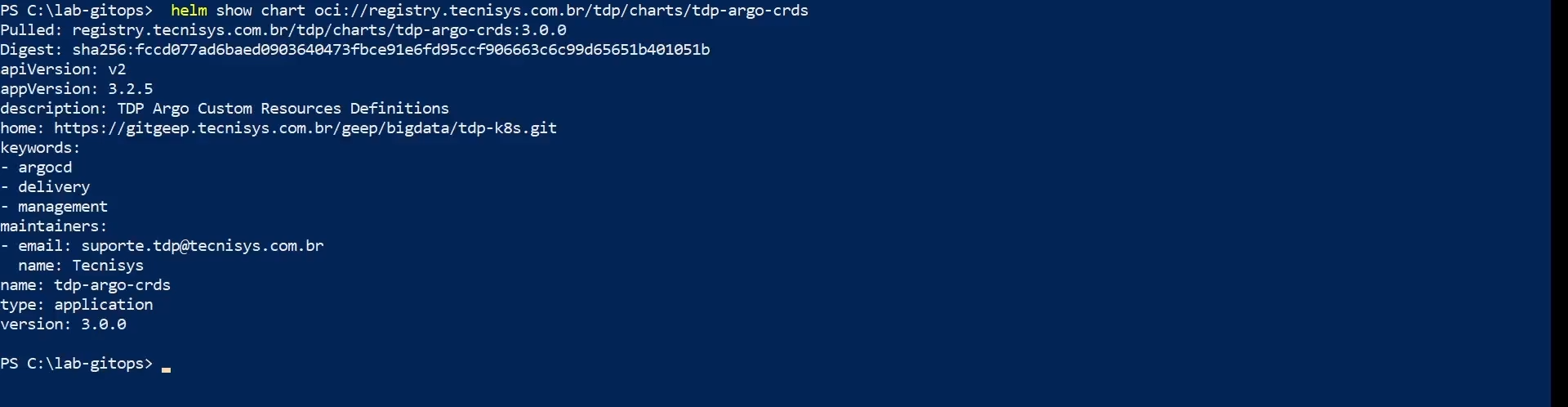
Check Available Version
Before updating, check the latest version available in the registry:
helm show chart oci://registry.tecnisys.com.br/tdp/charts/<chart>
To update to a specific version:
helm upgrade <RELEASE_NAME> oci://registry.tecnisys.com.br/tdp/charts/<chart> \
  -n <NAMESPACE> \
  -f values.yaml \
  --version <CHART_VERSION>
Version Compatibility
When upgrading TDP Kubernetes components, note:
- Incremental updates: always update version by version sequentially. Skipping intermediate versions may cause incompatibilities.
- Dependencies between components: some components depend on specific versions of others. For example,
tdp-trinomay depend on a minimum version oftdp-hive-metastore. - Kubernetes compatibility: check if the chart version is compatible with the version of your Kubernetes cluster.
- helm-upgrade
Post-Update Validation
After each update, perform the validations below.
- Commands
- Videos
Check pods and workload readiness
kubectl get pods -n <NAMESPACE>
kubectl get statefulset -n <NAMESPACE>


If the application uses Deployment, also validate:
kubectl get deploy -n <NAMESPACE>
What to confirm:
- The pods are in
STATUSRunning - Pods
READYcolumn is complete, for example1/1 - The application's StatefulSets or Deployments show all ready replicas, for example
1/1,2/2or3/3
Check Helm Releases
helm list -n <NAMESPACE>

All releases must have deployed status.
Check Services
kubectl get svc -n <NAMESPACE> -l app.kubernetes.io/instance=<RELEASE_NAME>

Check Persistent Volumes
kubectl get pvc -n <NAMESPACE>

All Persistent Volume Claims must have Bound status.
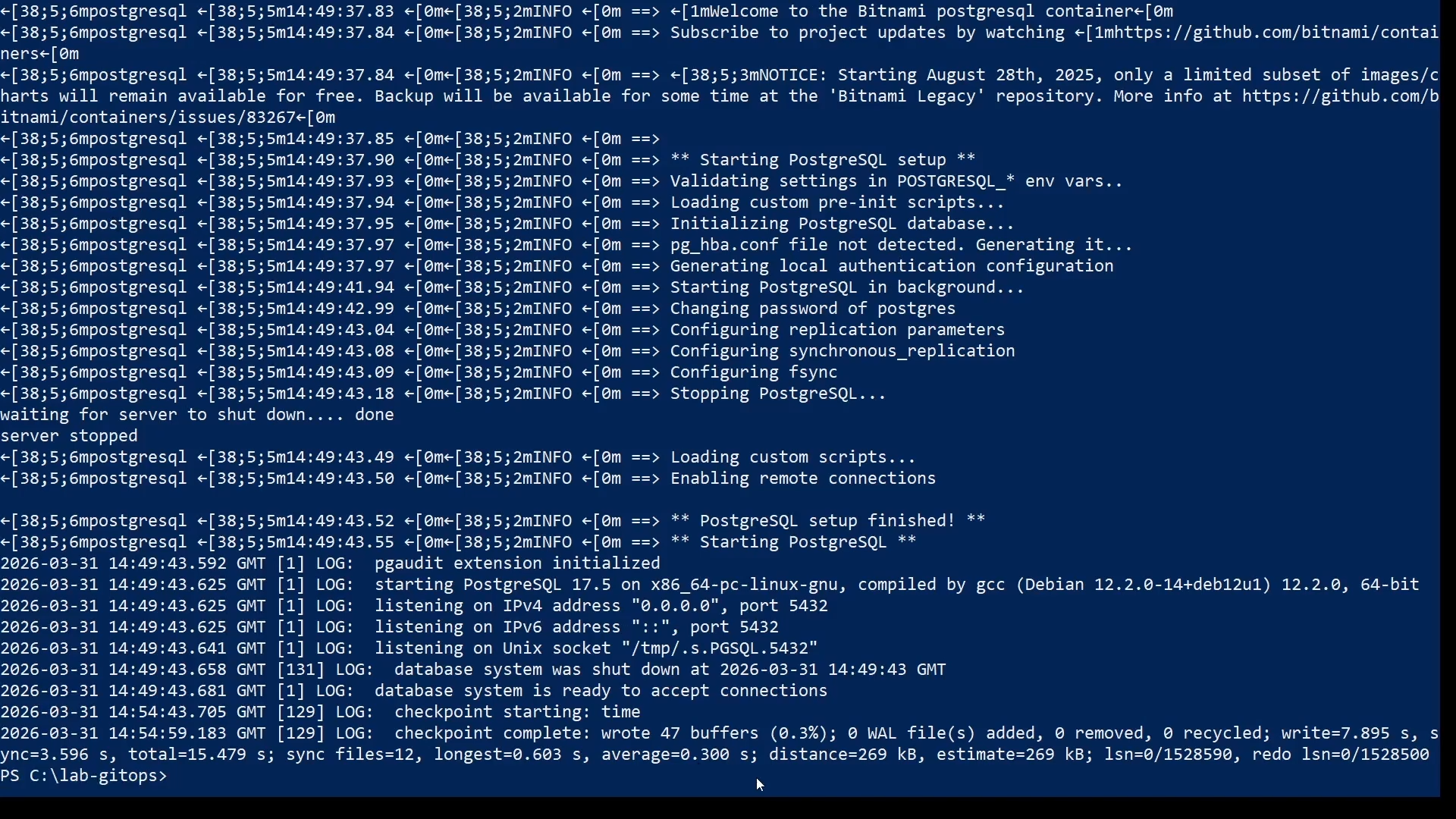
Check Logs
Analyze the updated component logs to identify possible errors:
kubectl logs -n <NAMESPACE> -l app.kubernetes.io/instance=<RELEASE_NAME> --tail=100
Check Helm Revision
Confirm that the release revision was successfully incremented:
helm history <RELEASE_NAME> -n <NAMESPACE>
- helm-list
- get-pods
- get-statefulset
- get-svc
- get-pvc
- helm-history
Troubleshooting
- Commands
- Video
Identify the Problem
Check the release status:
helm status <RELEASE_NAME> -n <NAMESPACE>
Analyze Kubernetes events to identify the cause of the failure:
kubectl describe pods -n <NAMESPACE> -l app.kubernetes.io/instance=<RELEASE_NAME>
kubectl get events -n <NAMESPACE> --sort-by='.lastTimestamp'
Rollback the Update
If necessary, roll back to the previous version:
helm rollback <RELEASE_NAME> -n <NAMESPACE>
See the Rollback page for detailed instructions.
Force Pods to Recreate
In some cases, you may need to force pods to be recreated to apply settings correctly:
kubectl rollout restart deployment/<deployment> -n <NAMESPACE>

# or for StatefulSets:
kubectl rollout restart statefulset/<statefulset> -n <NAMESPACE>
To find the name of the Deployment or StatefulSet:
kubectl get deployments,statefulsets -n <NAMESPACE> -l app.kubernetes.io/instance=<RELEASE_NAME>
The rollout restart restarts the pods in a controlled manner (rolling update). For components without configured replicas, there will be brief unavailability during restart.
Uninstall a Problem Component
To uninstall and reinstall a specific component:
helm uninstall <RELEASE_NAME> -n <NAMESPACE>
helm install <RELEASE_NAME> oci://registry.tecnisys.com.br/tdp/charts/<chart> \
  -n <NAMESPACE> \
  -f values.yaml
Uninstalling a Helm release does not remove the associated Persistent Volume Claims (PVCs). For a clean reinstallation, delete the PVCs manually before reinstalling:
kubectl delete pvc <pvc-name> -n <NAMESPACE>
Video coming soon.