Backup Environment Configuration
In this option, it is possible to define where the base data directory for the PostgreSQL cluster is located.
During the backups, the provided value will be compared with the path where PostgreSQL is running, and these must be the same, or the backup will return an error.
By default, RHEL 7-8 stores clusters in: /var/lib/pgsql/[version]/data.
Non-interactive execution is disabled for this operation.
pgsmart backup config
-
Select the
PgSmart Agent(or register new Agent). -
Select the
Backup EnvironmentsSection (selection is made with the [spaces] key).Upon selecting the
Backup Environmentssection, the following operations are made available:
- List configured Backup Environments.
- Add a Backup Environment.
- Activate a Backup Environment.
- Start a Backup Environment.
- Stop a Backup Environment.
- Verify a Backup Environment.
- Remove a Backup Environment.
If no backup environment is found, PostgreSYS opens the possibility of creating a new one.
List a Backup Environment
- Instructions
- Video
-
Select the
Listoperation -
Configured Backup environments will be displayed.
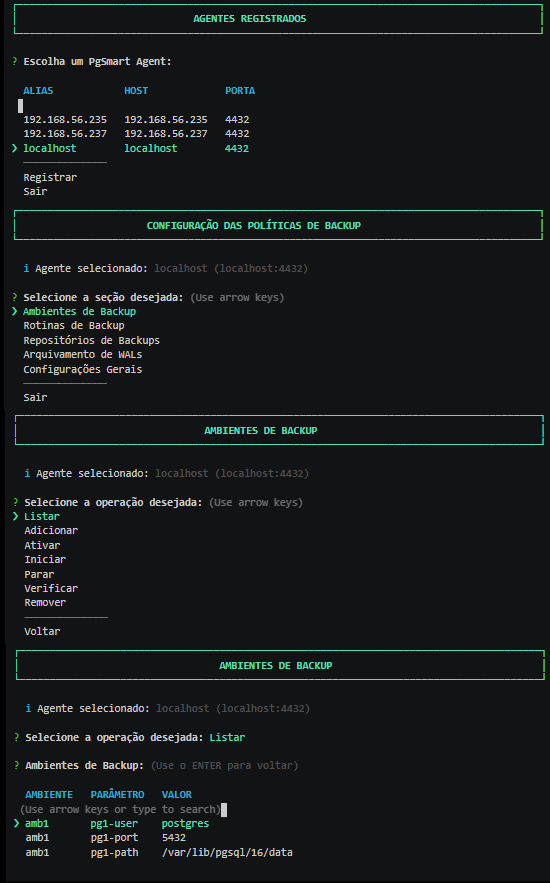 Figure 1 - Environment Configuration - List
Add a Backup Environment
- Instructions
- Video
-
Select the
Addoperation. -
Provide a
Namefor the backup environment. -
Provide the
Hostname/IP of the PostgreSQL instance(Default: localhost). -
Provide the
SSH Connection Portfor the PostgreSQL instance. -
Provide the
SSH connection Userfor the PostgreSQL instance. [Default: postgres] -
Provide the
Connection Portof the PostgreSQL instance. -
Provide the
Data Directoryof the PostgreSQL instance. -
Provide the
Connection Userof the PostgreSQL instance. -
Confirm if you wish to add another
clusterto the backup environment being created. Figure 2 - Environment Configuration - Add
-
Within a Backup Environment, it is possible to have more than one
clusterregistered. However, this second environment refers to replicas, since each Backup Environment relates to a single Master instance. -
A Master instance can have several replicas linked, but natively, there is no Master/Master replication in PostgreSQL.
-
By including more than one instance, o pgBackRest "interprets" the additional instances as "replicas". And it is possible to point to the "replicas" (in the Backup Routines) for executing
Backups, freeing up the 'Master' instance from processing operations, file copies, and compression, etc. -
PostgreSQL replicas, by nature, do not accept writes, only reads. This makes them less processing-heavy and, consequently, a more efficient
Backup. -
To validate the operation of the Backup Environment, use the
Listoption.
Activate the Backup Environment
- Instructions
- Video
The WAL archiving of the clusters involved must be configured for the selected backup environment. Otherwise the operation will be aborted.
-
Select the
Activateoperation. -
Select the
Backup environment. -
Confirm if the WAL archiving of the involved
clustersis set up for the selected environment (it's a prerequisite). -
Confirm the activation of the selected backup environment.
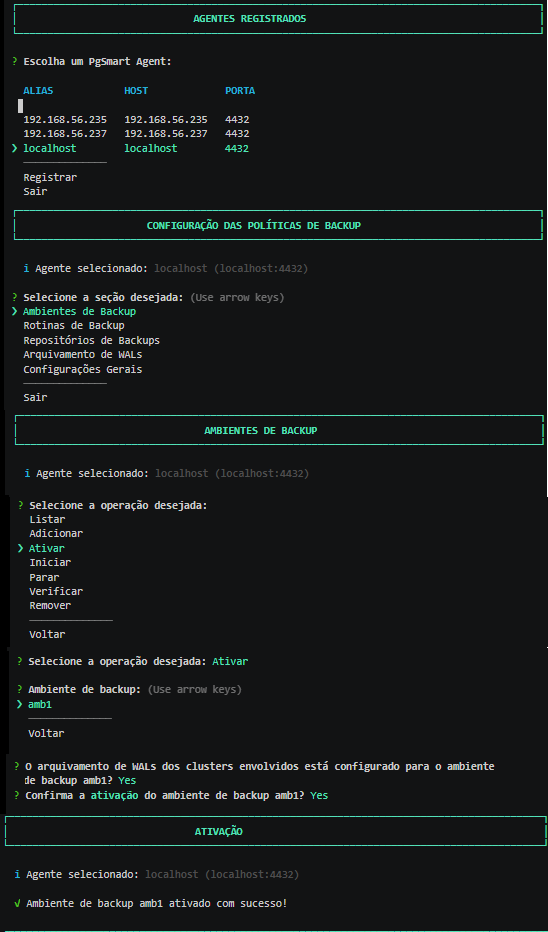 Figure 3 - Environment Configuration - Activation
Start the Backup Environment
Cancels the suspension of backup routines effected through the stop command.
- Instructions
- Video
-
Select the
Startoperation. -
Select the
Environmentyou wish to start.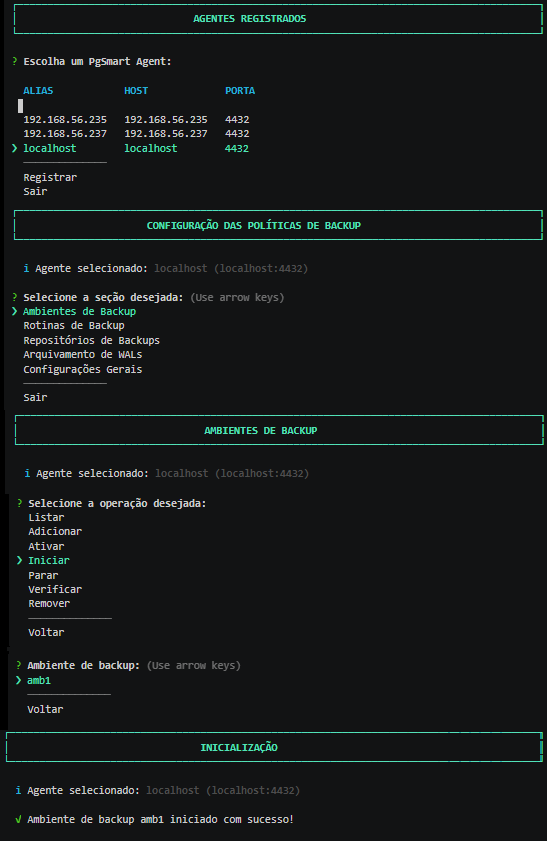 Figure 4 - Environment Configuration - Start
Stop the Backup Environment
Makes the Backup Environment unavailable, suspending the execution of ongoing routines, aiming to prevent routines from being executed while, for example, maintenance on the 'storage' is being done.
- Instructions
- Video
-
Select the
Stopoperation. -
Select the
Environmentyou wish to suspend.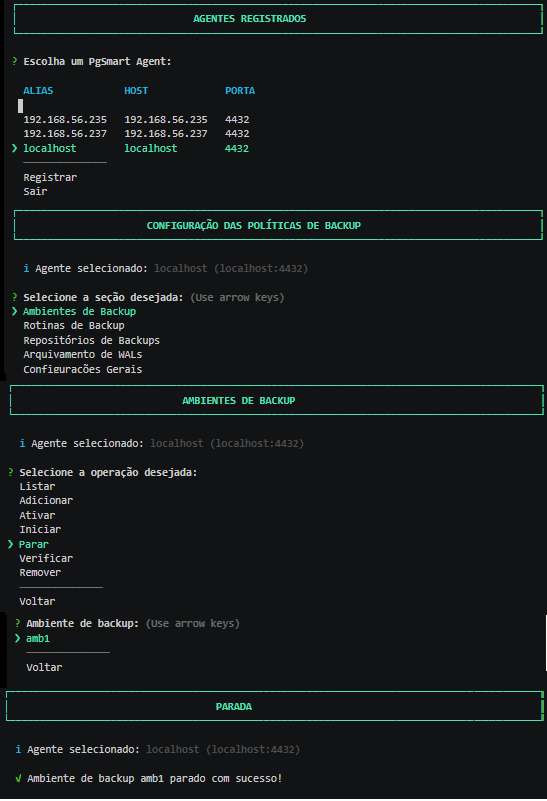 Figure 5 - Environment Configuration - Stop
Verify the Backup Environment
- Instructions
- Video
Ambiente de backup ativado
-
Select the
Verifyoperation. -
Select the
Environmentyou wish to verify.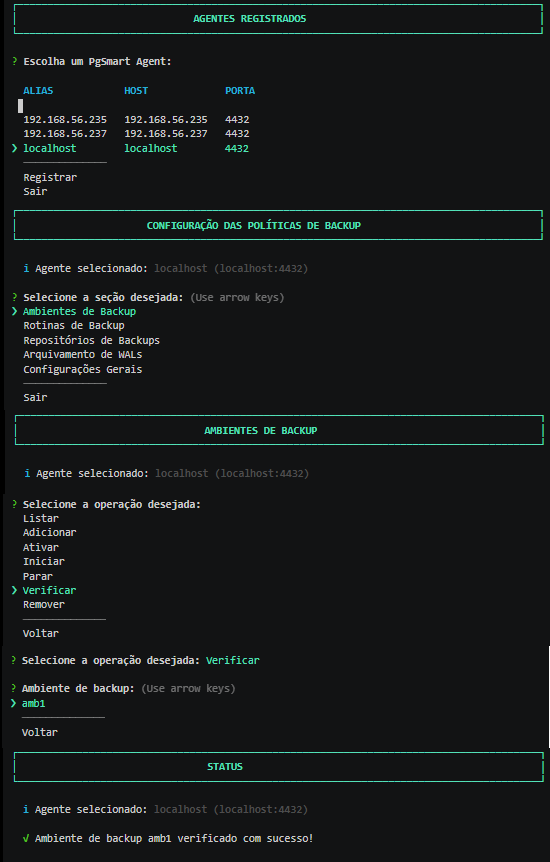 Figure 6 - Environment Configuration - Verification
Remove the Backup Environment
Deactivates the Backup Environment.
- Instructions
- Video
-
Select the
Removeoperation. -
Select the
Environmentyou wish to remove. -
Confirm the deletion of the backup environment.
-
Confirm the removal of the backup environment from the global settings.
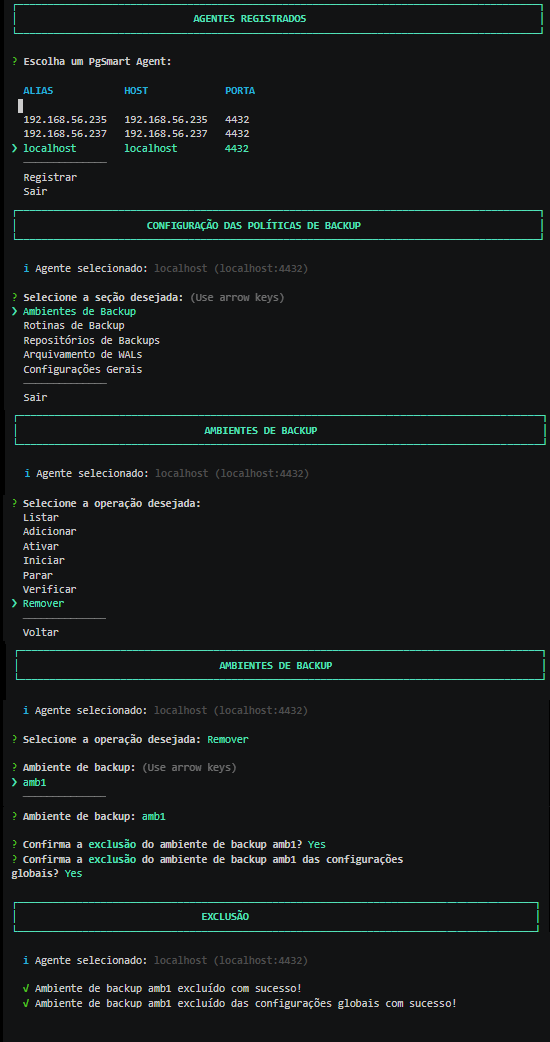 Figure 7 - Environment Configuration - Removal
Details of the command executions can be viewed in the following files:
- /var/log/pgsmart-agent/pgsmart.log
- /var/log/pgsmart-client/pgsmart.log
- /var/log/pgbackrest/[backup environment]-start.log
- /var/log/pgbackrest/[backup environment]-stop.log
- /var/log/pgbackrest/[backup environment]-stanza-create.log
- /var/log/pgbackrest/[backup environment]-stanza-delete.log