Backup Visualization
Command Syntax
Terminal input
pgsmart backup
pgsmart backup info
Options supported by the Command:
-a, --agent=<agent>=> Alias, hostname or IP of the server where a PgSmart Agent is installed.-b, --backup=<value>[default: All] => Backup identifier.-h, --help=> Help.-j, --job=<value>=> Identifier of the backup/restore job.-o, --only-info=> Indicates that only information from the backup environments is to be shown. Used in conjunction with the --quiet option.-p, --no-page-info=> Indicates that the backup environment information should not be paginated. Used in conjunction with the --quiet option.-q, --quiet=> Non-interactive execution for backup operations (exec|info|restore). Used in conjunction with the --site and --agent options.-s, --site=<value>[default: All] => Name of the backup environment.'
Non-interactive Viewing
Terminal input
pgsmart backup info -s <environment-name> -q
Terminal input
pgsmart backup info -s <environment-name> --backup <backup-name> -qp
Interactive Execution
Interactive Viewing
Terminal input
pgsmart backup info
- Instructions
- Video
-
Select the PgSmart Agent (or register new Agent).
-
Select the Backup Environment to be viewed.
-
Select the type of information desired: Backups, Backup Tasks, Restore Tasks
If the Backups option is selected:
-
Select the desired Backup (or "all").
-
PgSmart will display details of the selected backup(s).
If the "Backup Tasks" option is selected:
-
Select the desired task.
-
PgSmart will display details of the selected backup task, with the option to view the operation log.
If the "Restore Tasks" option is selected:
-
Select the desired restore task.
-
PgSmart will display details of the selected restore task, with the option to view the operation log.
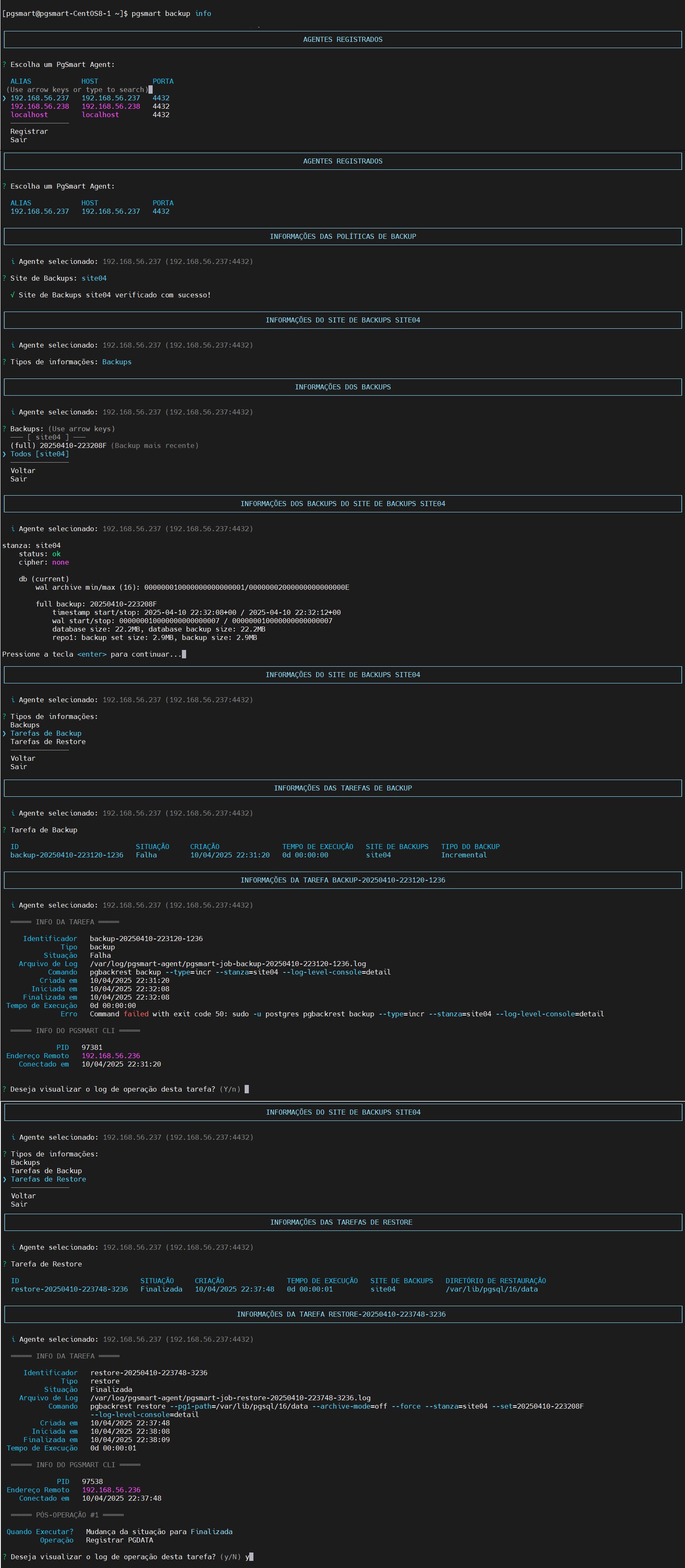 Figure 1 - Backup Info
Carregando...