Install TDP APIM Insights
for WSO2 API Manager.
With tdpctl, prepare the TDP Cluster and configure WSO2 API Manager to send API usage data, which you analyze in Apache Superset.
The TDP WSO2 APIM Insights extension lets you analyze and visualize the usage data of the APIs managed by WSO2.
To install it, you need the extension file (.taf), provided individually by Tecnisys after the product is purchased. If you want to purchase it, contact us.
The TDP WSO2 APIM Insights extension file (.taf).
Installed and configured, with the Apache NiFi, Apache Kafka, Apache Druid, and Apache Superset services running.
Installed and configured.
The TDP Command Line Interface, tdpctl, installed.
Your environment
If you fill in your environment details here, the examples and commands on the page use what you provided. The path of the .taf file must be absolute.
Installation stages
The extension is installed in two stages, run in sequence with the same command, addon-install:
1st stage
BIG-DATA
Runs on one of the TDP Cluster hosts. Configures the cluster services used by the extension.
2nd stage
API-MANAGER
Runs on the host where WSO2 API Manager is installed. Configures the data delivery to the TDP Cluster.
Afterward
Analysis in Superset
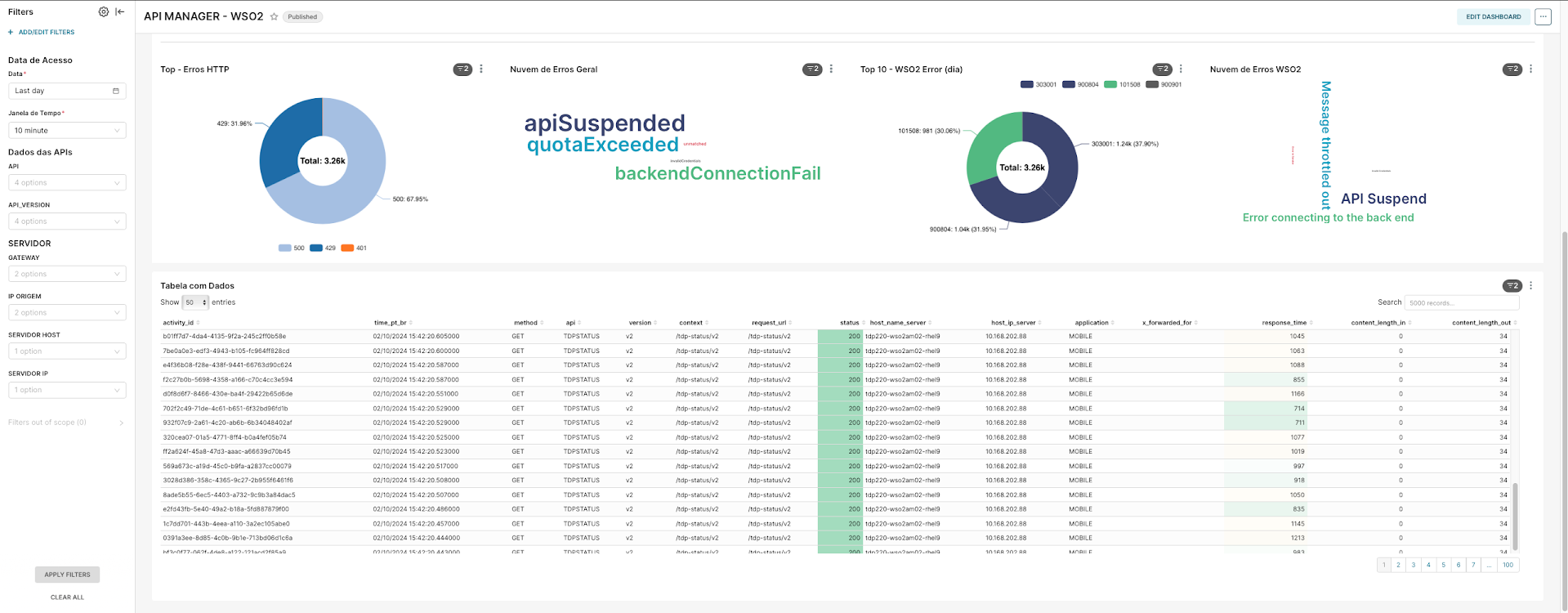
The API usage data is available in the API MANAGER-WSO2 dashboard in Apache Superset.
In a WSO2 API Manager deployment with more than one node, the API-MANAGER stage must be run on all machines.
Scenarios
- 1 · Stage
BIG-DATA - 2 · Stage
API-MANAGER - 3 · Analyze the data
in Superset
On one of the TDP Cluster hosts: Ambari, NiFi, Druid, and Superset.
In the BIG-DATA stage, tdpctl requests information, performs checks, and runs operations on the TDP Cluster services used by the extension: Apache NiFi, Apache Kafka, Apache Druid, and Apache Superset.
Run the installation command
tdpctl started with the extension file.
tdpctl addon-install -f <TAF_FILE>
Start the installation in the big-data stage
The BIG-DATA stage selected.
- Select the desired language (1-English, 2-Portuguese).
- Enter the TDP extension file (
.taf), if it was not provided in the command (-for--fileoption). - Enter the password to decrypt the file.
- Confirm that you want to start the extension installation operation.
- Select the big-data stage (option 1).
Enter the Ambari details
tdpctl connected to the Ambari of the TDP Cluster.
- Enter the Ambari Web host [Default: localhost].
- Enter the Ambari Web port [Default: 8080].
- Enter the communication protocol used by Ambari Web [Default: http].
- Enter the name of the TDP Cluster defined in Ambari.
- Enter the Ambari authentication user [Default: admin].
- Enter the Ambari authentication password.
Enter the NiFi, Druid, and Superset credentials
tdpctl authenticated on the services used by the extension.
- Enter the NiFi authentication user and password.
- Enter the Druid authentication user and password.
- Enter the Superset authentication user and password.
Copy the NiFi URL
The Apache NiFi service URL saved for the API-MANAGER stage.
Check all the steps of the BIG-DATA stage in the following image.
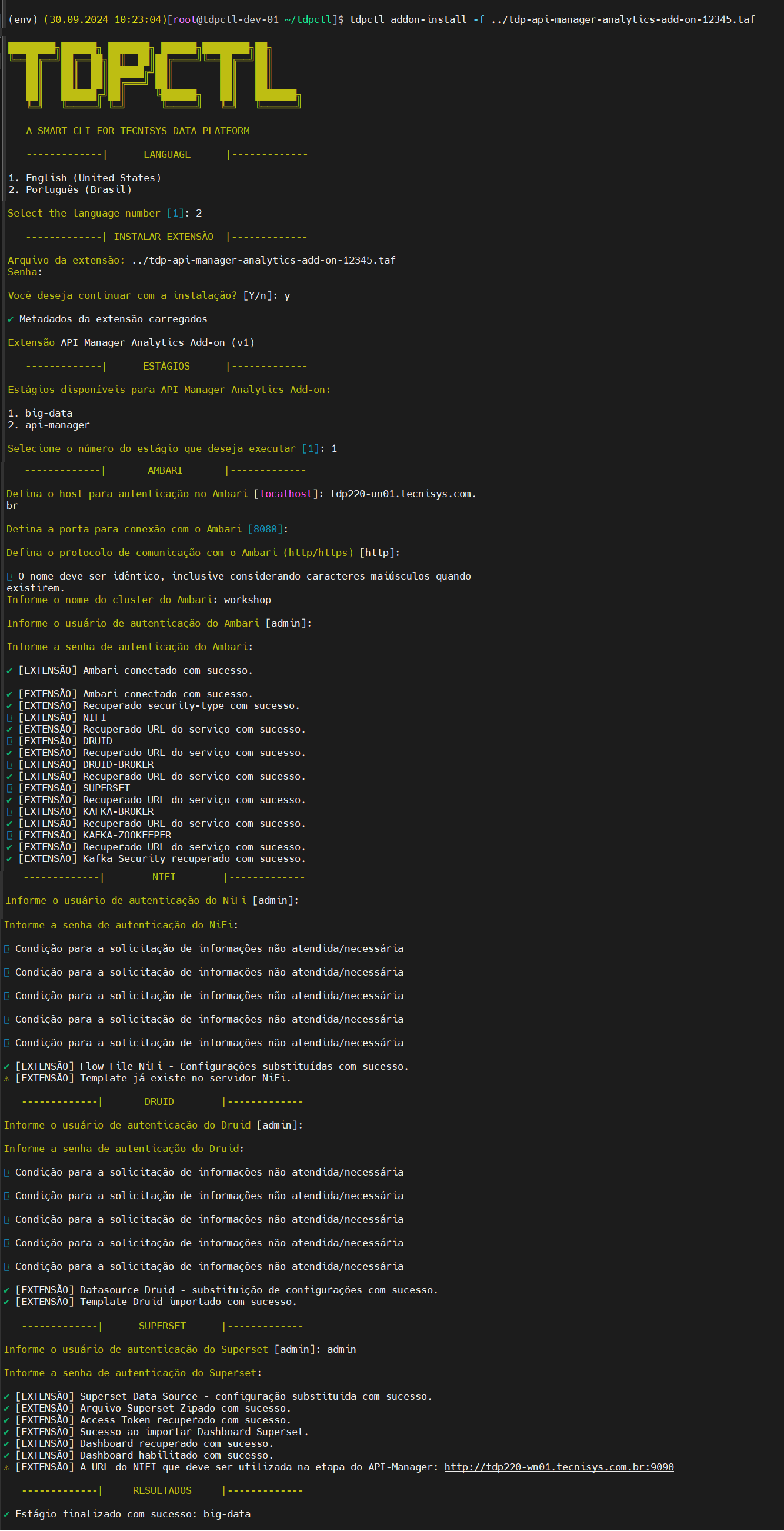
At the end of this stage, the Apache NiFi service URL is provided. Copy it, because you must enter it in the API-MANAGER stage.
It worked when
Terminal recording: BIG-DATA stage
On the WSO2 API Manager host, with the NiFi URL from the previous stage.
In the API-MANAGER stage, WSO2 API Manager is configured to send data to the TDP Cluster, enabling API monitoring.
Run the installation command
tdpctl started with the extension file.
tdpctl addon-install -f <TAF_FILE>
Start the installation in the api-manager stage
The API-MANAGER stage selected.
- Select the desired language (1-English, 2-Portuguese).
- Enter the TDP extension file (
.taf), if it was not provided in the command (-for--fileoption). - Enter the password to decrypt the file.
- Confirm that you want to start the extension installation operation.
- Select the api-manager stage (option 2).
Enter the WSO2 API Manager details
WSO2 API Manager configured to send data to the TDP Cluster.
- Enter the WSO2 API Manager URL for version verification.
- Enter the WSO2 API Manager user [Default: admin].
- Enter the WSO2 API Manager password.
- Enter the WSO2 API Manager installation path [Default: /opt/wso2am].
- Enter the WSO2 API Manager daemon service name [Default: wso2am].
- Enter the WSO2 API Manager service user [Default: wso2user].
- Enter the Apache NiFi service URL, provided in the BIG-DATA stage. If NiFi runs as a cluster, enter the URL of one of the nodes.
Check all the steps of the API-MANAGER stage in the following image.
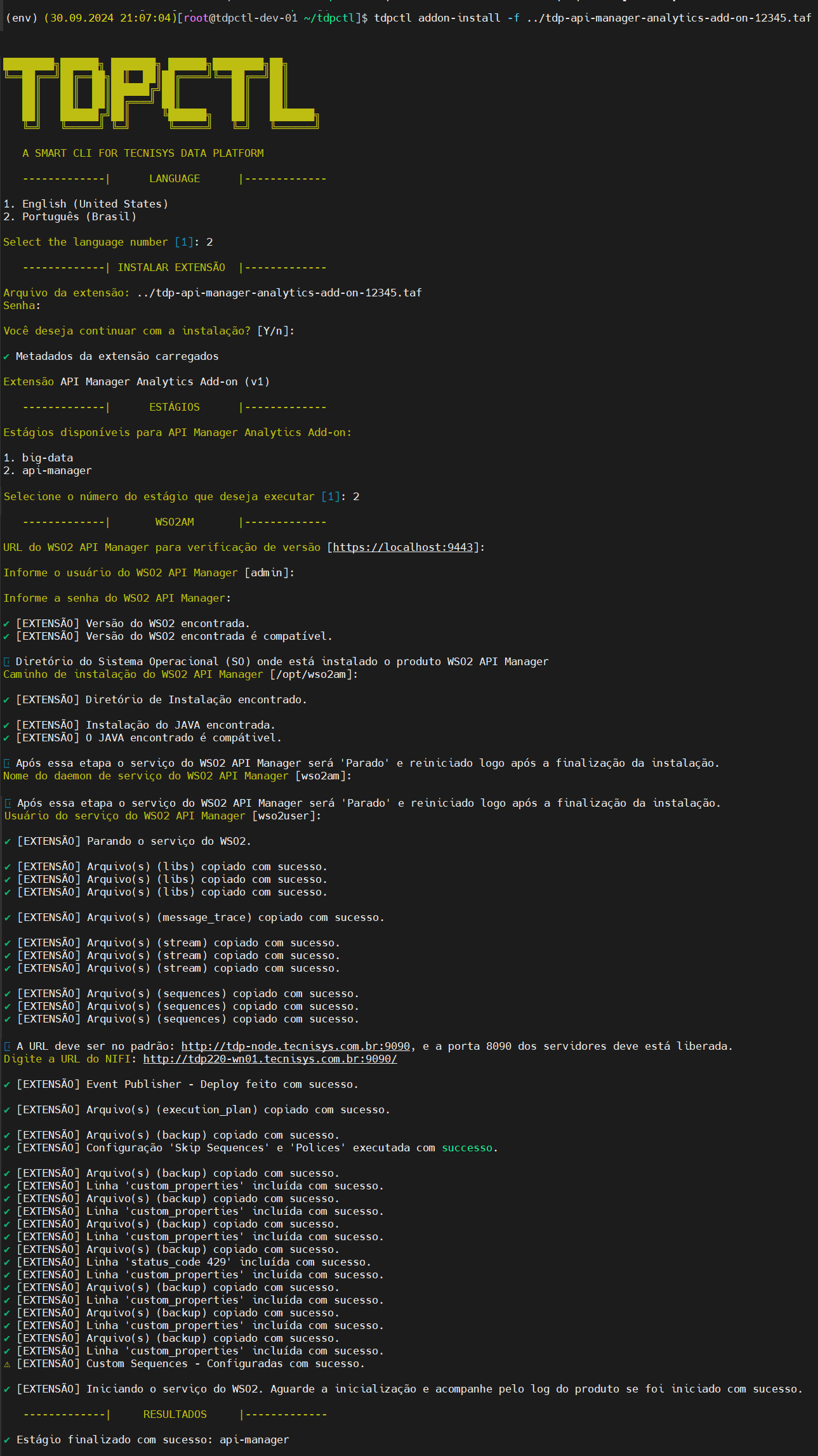
Terminal recording: API-MANAGER stage
The API MANAGER-WSO2 dashboard in Apache Superset.
After the extension is installed, the usage data of the APIs managed by WSO2 API Manager can be analyzed and visualized in Apache Superset.
Access Apache Superset
The Superset home page open.
Access the Apache Superset web interface. The link is available in the Quick Links section of Ambari Web.
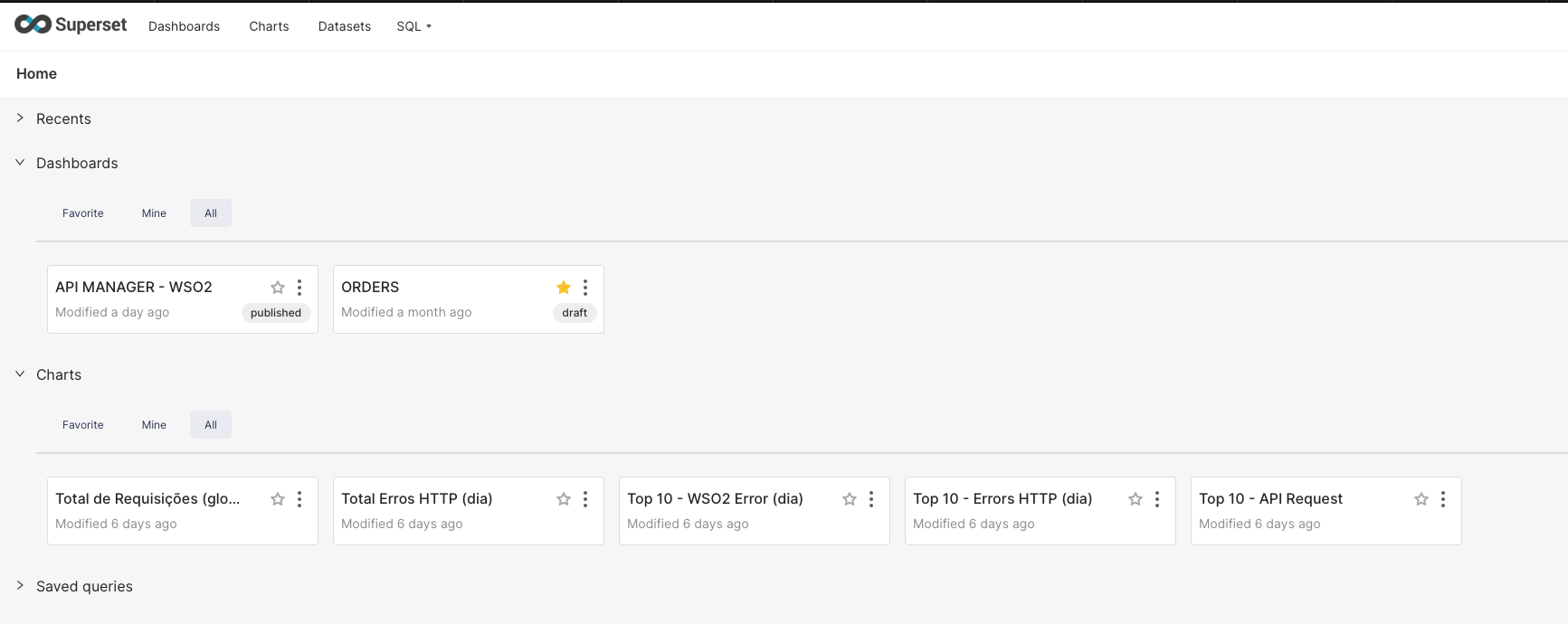
Select the API MANAGER-WSO2 dashboard
The extension dashboard open.
In the Dashboards tab, select the API MANAGER-WSO2 dashboard.
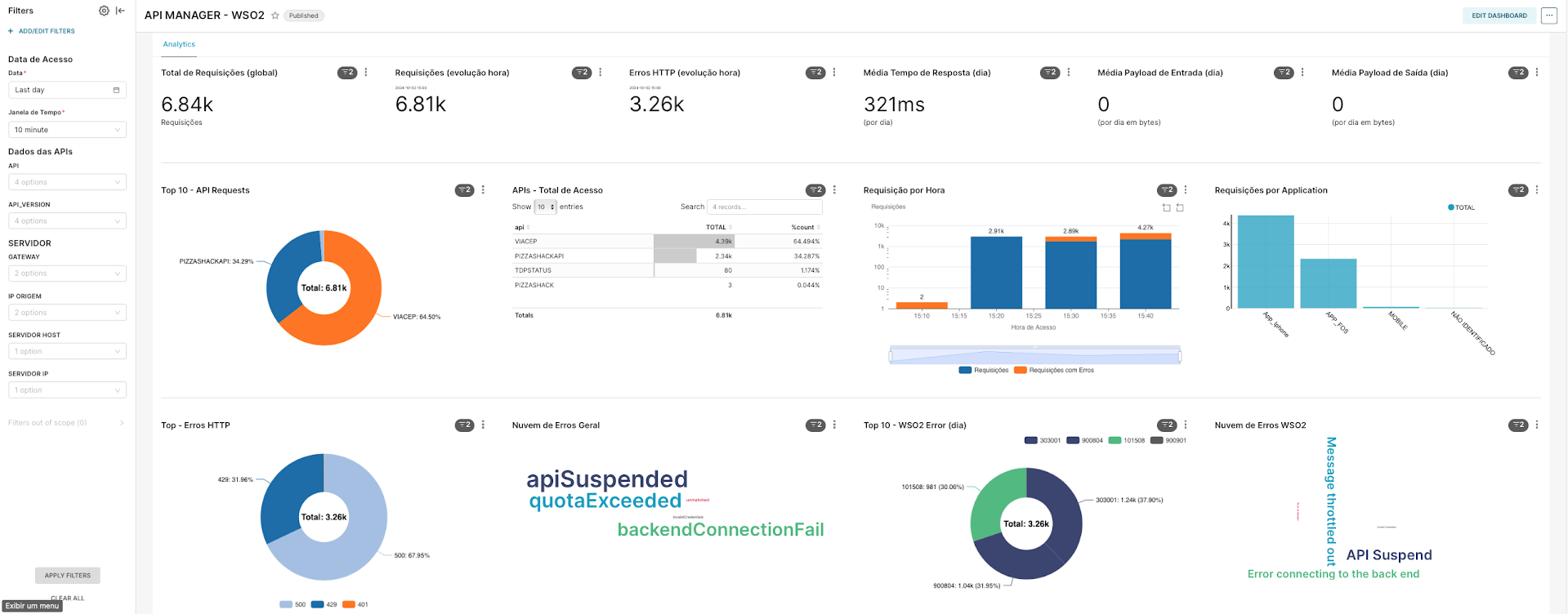
Analyze the API usage data
The API usage data filtered in the dashboard.
Use the available filters and tables to analyze the API usage data.
Video: example 1
Video: example 2
Command syntax
tdpctl addon-install [OPTIONS]
| Option | What it does |
|---|---|
-f, --file | TDP extension file (.taf) to install. |
-p, --password | Password to decrypt the extension. |
-y, --yes | Confirms the extension installation. |
-t, --trace | Shows the traceback of the error. |
--help | Shows the help and exits. |
To provide the TDP extension file (.taf) in the command, use the -f or --file option. If you do not provide the file in the command, tdpctl asks for it during execution. The file path must be absolute.
tdpctl addon-install --help
It worked when
addon-install command help is shown with its options.$ tdpctl addon-install --help
Usage: tdpctl addon-install [OPTIONS]
Install a TDP add-on.
Options:
-f, --file TEXT TDP add-on file to install.
-p, --password TEXT The password to decrypt the add-on.
-y, --yes Confirm the add-on installation.
-t, --trace Show the traceback of the error.
--help Show this message and exit.Installation logs
The installation logs of the TDP WSO2 APIM Insights extension are stored in the tdpctl installation directory (<TDPCTL_DIR>). To follow them, run:
tail -f <TDPCTL_DIR>/tdpctl.log