PgBouncer Metrics Exporter Configuration
The PgBouncer Metrics Exporter exposes metrics such as the number of active connections, connections waiting in the queue, and PgBouncer resource usage, among others. This information is important to tune pooling behavior and ensure the environment responds efficiently to client requests.
Through this configuration option you can set the port where PgBouncer metrics will be exposed so they can be scraped by Prometheus.
To perform this operation, the user "pgsmart_metrics" must exist on the PgBouncer instances where the Exporter will be configured.
The user can be configured during the PgBouncer Metrics Exporter setup process—just confirm the operation.
The user can also be configured manually, through the following steps:
√ Add the user to PgBouncer’s userlist.txt configuration file;
√ Add the user to the PgBouncer stats_users parameter;
In addition, it is necessary to configure the value "extra_float_digits" in the "ignore_startup_parameters" parameter on the PgBouncer instances where it will be configured.
- This configuration is required so the connection driver to the instance ignores certain parameters when initializing connections. For more information, see: https://docs.tecnisys.com.br/PgBouncer/1.24.0/config.html#_ignore_startup_parameters
This information will NOT be stored and will only be used during the configuration operation.
The PgBouncer Metrics Exporter will be configured whether or not these settings exist in PgBouncer. However, metrics will only start being exported once everything is configured on the PgBouncer instance and the service of this Metrics Exporter is started.
The pgsmart_metrics user password can be changed in PgSmart Web or in PgSmart Cli via the metrics_password parameter.
- Observability components installed.
- Instance initialized.
pgsmart obs exporter config [FLAGS]
Flags
-a, --agent=<agent>=> Alias, hostname, or IP of the server where the desired PgSmart Agent is installed.-h, --help=> Help
Non-interactive execution is disabled for this operation.
pgsmart obs exporter config
PgBouncer Metrics Exporter Configuration
- Instructions
- Video
-
Select the PgSmart Agent or Register a new one.
-
Confirm whether you want to update the Platform package repository.
2.1. If confirmed, provide the new repository.
-
Select the PgBouncer Metrics Exporter.
-
Select the network interface for connection.
-
Add the connection pool management instance(s).
warningThis Metrics Exporter requires the prior configuration of the
ignore_startup_parametersparameter with the valueextra_float_digitsfor each PgBouncer instance.It is possible to apply this configuration via PgSmart, using the connection pool service configuration option.
This configuration is necessary so that the connection driver to the instance ignores certain parameters when initializing the connection.
It is important to note that the PgBouncer Metrics Exporter will be configured by PgSmart regardless of this configuration.
However, metrics export will only start after the
ignore_startup_parametersparameter is configured.5.1. Enter the connection pool management port.
5.2. Confirm whether you want to configure the
pgsmart_metricsaccess user in PgBouncer.5.3. Enter the metrics exposure and web interface port.
5.4. Confirm whether you want to add another connection pool management instance.
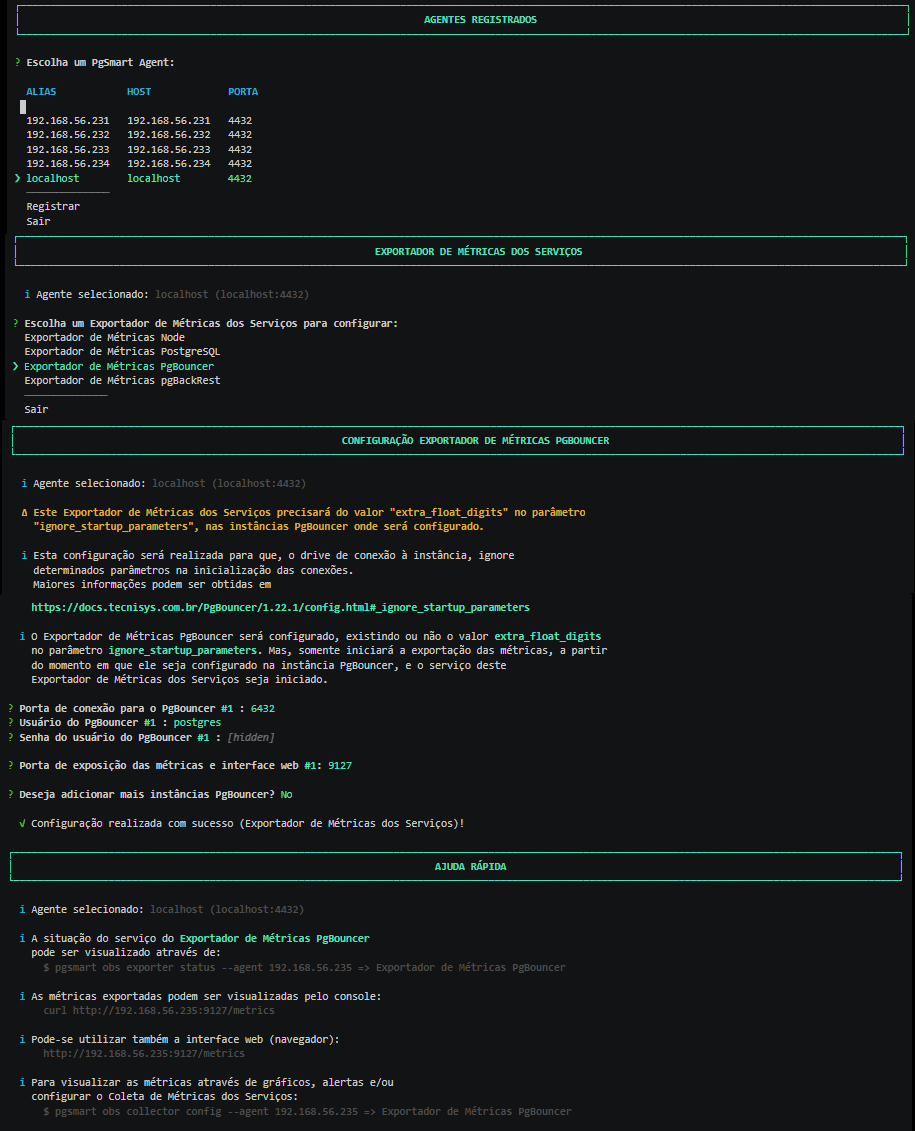 Figure 1 - PgBouncer Metrics Exporter Configurationnote
You can add as many instances as necessary.
noteExported metrics can be viewed via console:
Terminal inputcurl http://192.168.56.234:9100/metricsOr via the web interface:
Terminal inputhttp://192.168.56.234:9100/metrics