Navigation Cache
PostgreSYS uses a cache mechanism to optimize performance when loading data from agents, making navigation between site pages faster and smoother.
To ensure data integrity after changes made to agents—such as service status updates or the installation of new components—the cached data is invalidated and the updated information from the agents is loaded again.
The cache data revalidation process occurs automatically every 5 minutes. In addition, there are two other ways to invalidate and reload new information from agents: a global option, which clears the cache data of all agents, and an individual option, which clears only the cache of a specific agent.
Global Cache Revalidation
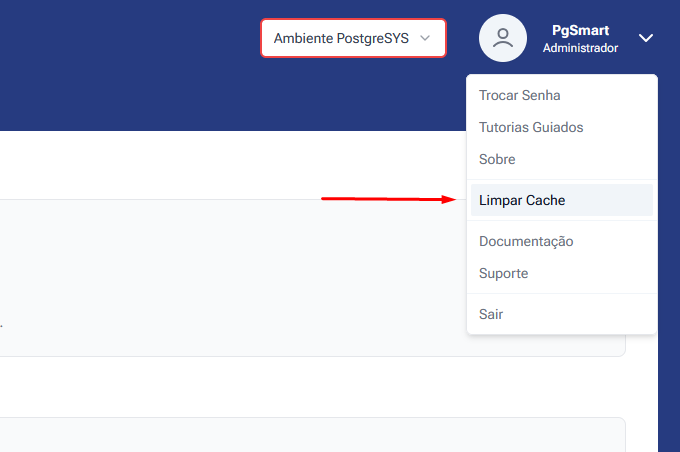
This feature allows clearing the cache of all system agents at once.
Where to find it: In the top menu, by clicking on the user profile/avatar.
Who can access it: Exclusive to users with the Administrator profile.
What the process does: When clicking on "Clear Cache", the system removes the cache entries of all active agents.
Expected result: The system will make a new direct request to the database/API to retrieve updated data.
Revalidation of a Specific Agent Cache
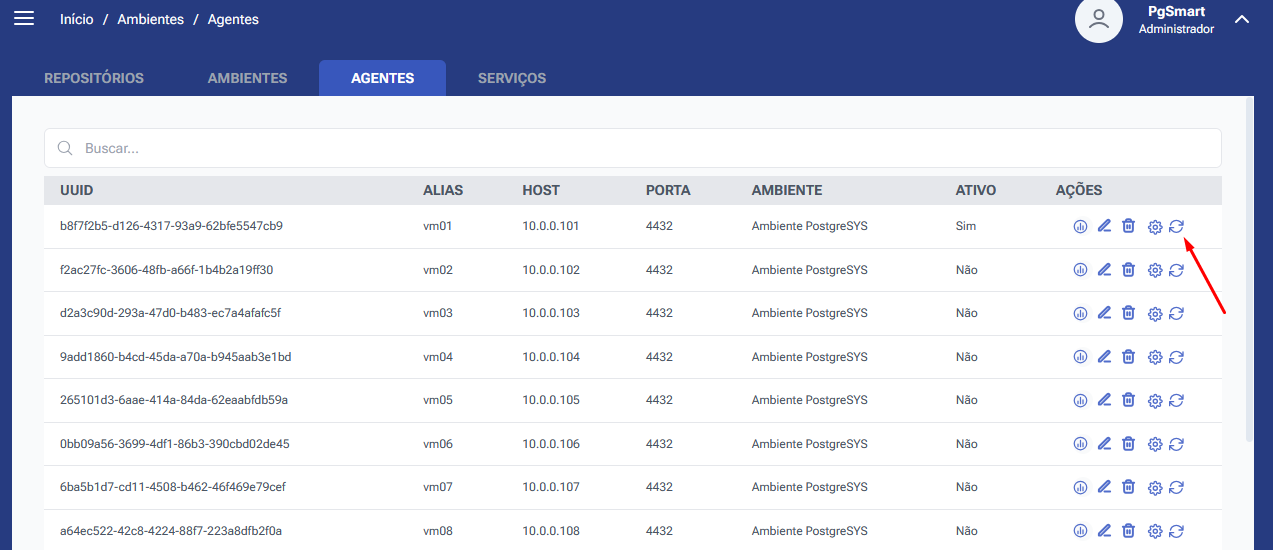
If there is a need to synchronize data for only one agent, it is possible to clear the cache of that agent without reloading data from all other agents in the environment.
Where to find it: Manage Environment > Agent List.
Action: Select the cache refresh icon/button on the row corresponding to each agent.
What the process does: Invalidates the cache exclusively for the selected agent.
Expected result: New requests will be made only for the selected agent, while keeping the cached data of the other agents unchanged.